
Windows System Configuration Registry Keys
Uncovering System Identity, Updates, and Hidden Configuration Evidence

Introduction
Before diving into user actions or application logs, investigators need to understand the system itself: what version of Windows it’s running, when it was installed, what networks it has touched, and how it’s configured to start up. The answers often live inside the Windows Registry, a hidden database that quietly tracks system settings. By analyzing system configuration keys, analysts can establish a reliable foundation for timeline reconstruction, detect anomalies, and uncover the subtle changes attackers leave behind. Most of the system configs will be found in SYSTEM and SOFTWARE hives.
Current OS Version & Historical OS Updates
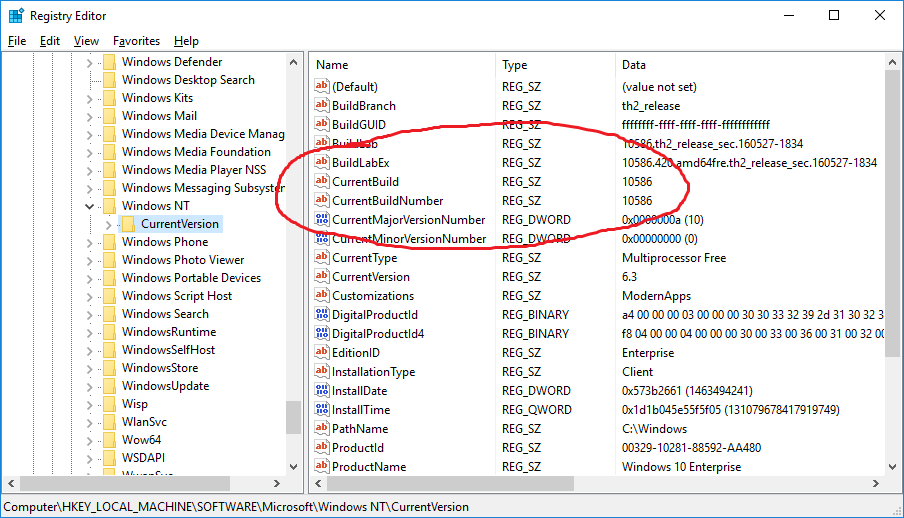
The Current OS Version is found in HKLM\SOFTWARE\Microsoft\Windows NT\CurrentVersion and contains the system’s present identity. Important fields include ProductName (edition, such as Windows 10 Pro or Windows 11 Home), CurrentVersion (major/minor version like 10.0), CurrentBuildNumber or CurrentBuild (specific build, e.g., 22621), and ReleaseId or DisplayVersion (marketing release like 21H2 or 22H2). The InstallDate field provides an epoch timestamp of when the OS was first installed, while RegisteredOwner and RegisteredOrganization show values entered during setup. From a forensic perspective, this gives a precise snapshot of what version of Windows is running right now and when it first came online.
Historical system changes are tracked under HKLM\SYSTEM\Setup. Keys such as SystemSetupInProgress, UpgradeInProgress, SetupType, CmdLine, and OOBEInProgress reveal whether the system was undergoing setup, upgrade, or cloning. The CloneTag appears after sysprep operations, while LastBootSucceeded and LastBootShutdown capture boot states. Even more revealing is the Source OS and Source OS (Updated on …) structure, which logs older builds with details like product name, install date, and file paths.
CurrentControlSet
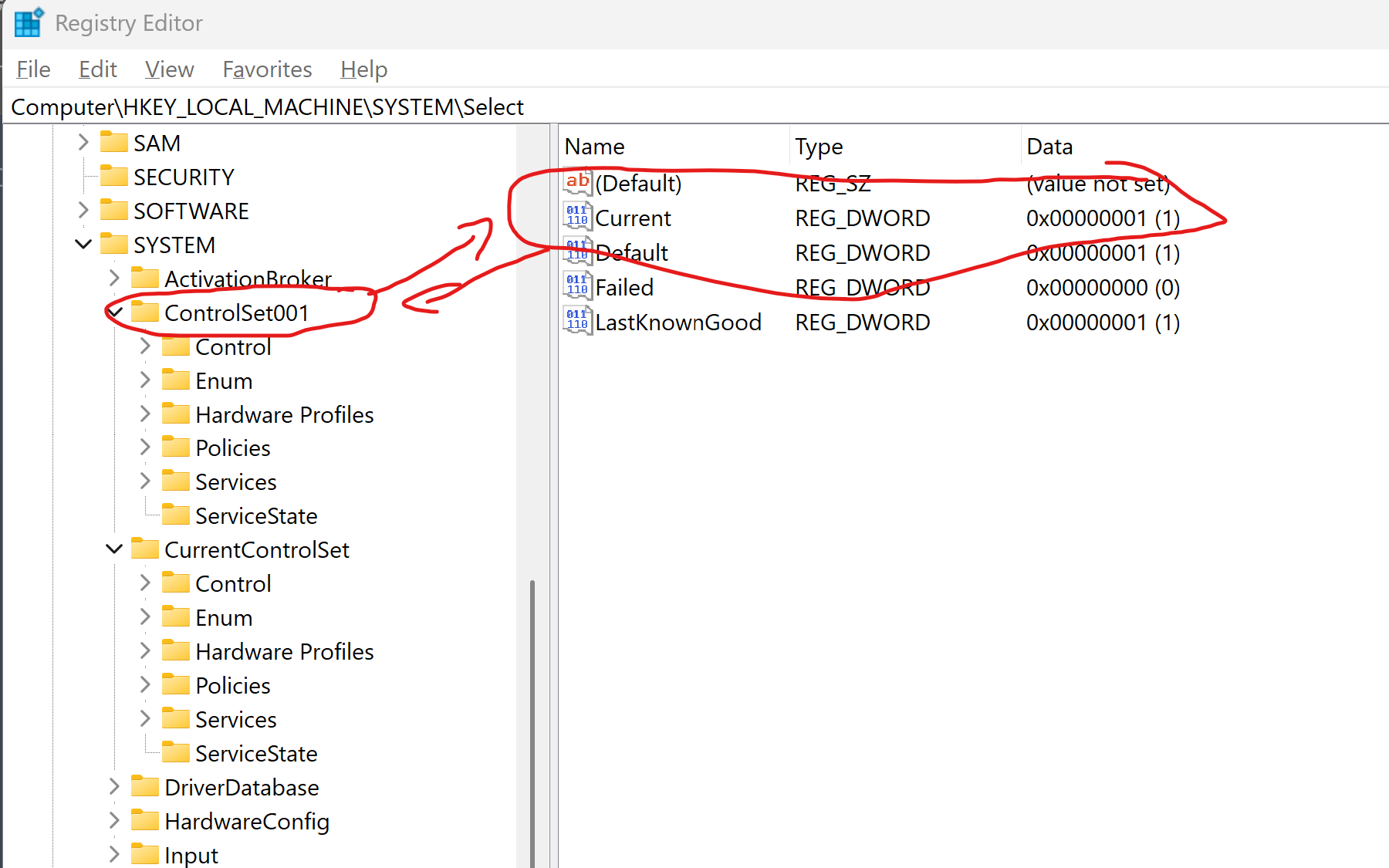
The CurrentControlSet is the active system configuration Windows loads at boot and is critical in forensic analysis. It is mapped at runtime through HKLM\SYSTEM\Select, where the Current value points to the active ControlSet00x, such as ControlSet001.
Modern versions of Windows typically maintain only one control set, but this still provides investigators with the most accurate snapshot of services, drivers, and boot parameters. For analysis, focusing on the set identified by the Current value ensures the configuration reflects how the system was running at the time of collection.
Computer Name & System Time Zone
The ComputerName key, located at SYSTEM\CurrentControlSet\Control\ComputerName\ComputerName, stores the system’s hostname. This value is crucial for confirming the identity of the machine under investigation and for correlating evidence across logs, network traffic, and artifacts that often reference hostnames instead of IP addresses. Investigators are advised to record the hostname at the start of an examination to avoid confusion or misattribution.
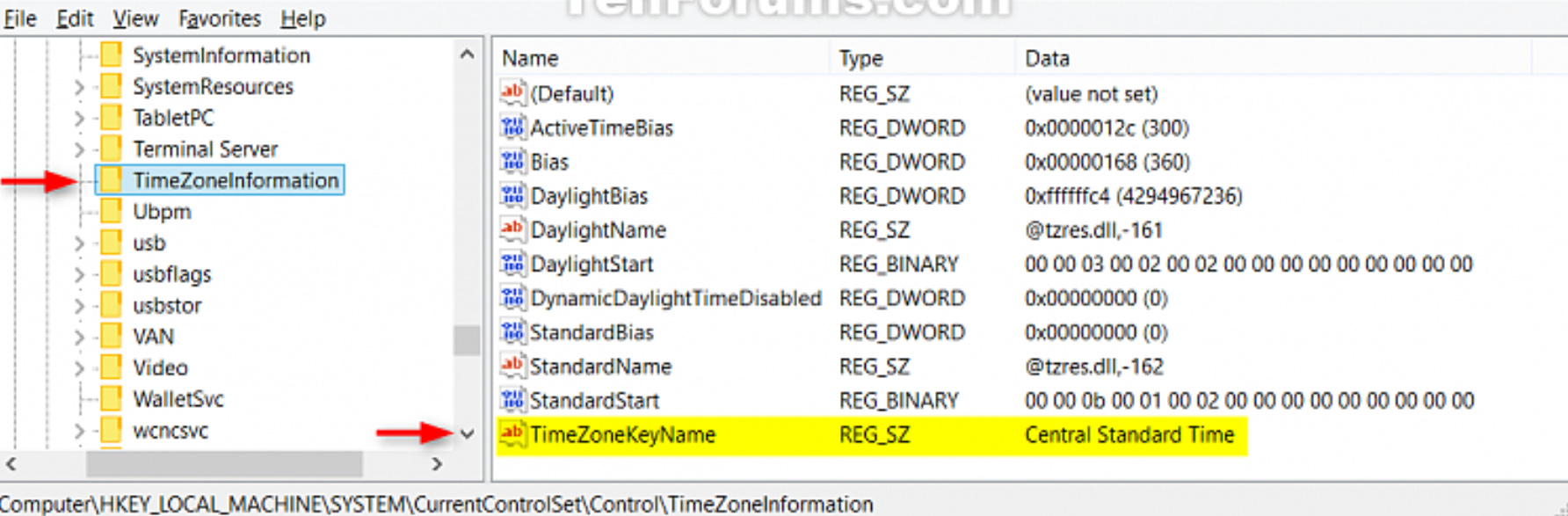
The TimeZoneInformation key, found at SYSTEM\CurrentControlSet\Control\TimeZoneInformation, records the system’s configured time zone. It provides values such as TimeZoneKeyName and ActiveTimeBias that are essential for translating local timestamps into accurate timelines. Since time zone changes are also logged in the Windows Event Log, investigators can track shifts in configuration over time. Correct interpretation of these settings is critical for event correlation across systems, which is why analysts typically work in UTC to eliminate offset errors.
Network Profiles and Network Connetions
The Windows Registry preserves a wealth of network data that can place a device in both time and space. Network interfaces, stored under SYSTEM\CurrentControlSet\Services\Tcpip\Parameters\Interfaces and linked with SOFTWARE\...\NetworkCards, record details like IP addresses, DHCP leases, and domains. Each adapter is identified by a GUID, which can represent wired, wireless, or VPN hardware. Forensically, these entries allow analysts to determine how a system was connected and to reconstruct timelines from DHCP lease information or historical settings.
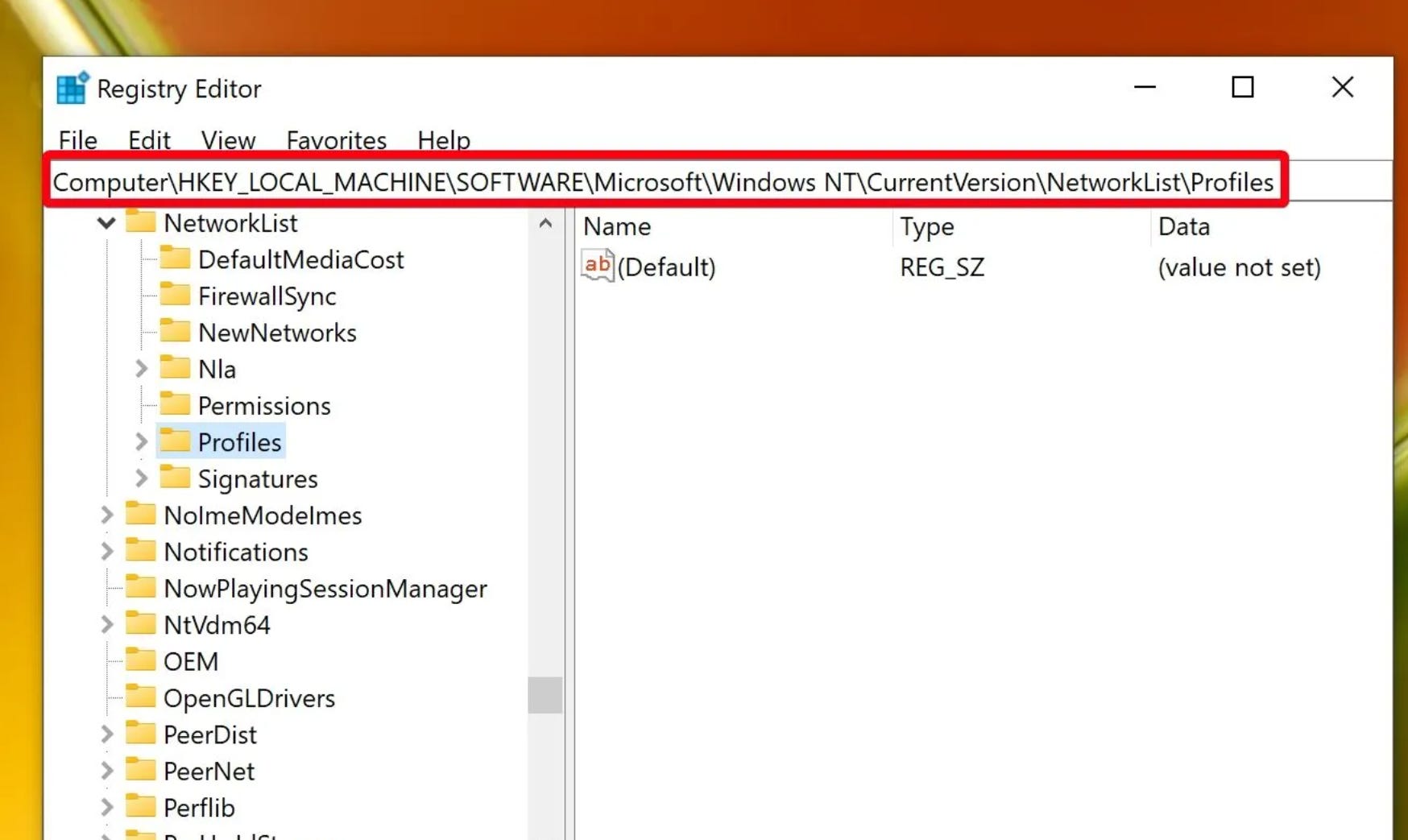
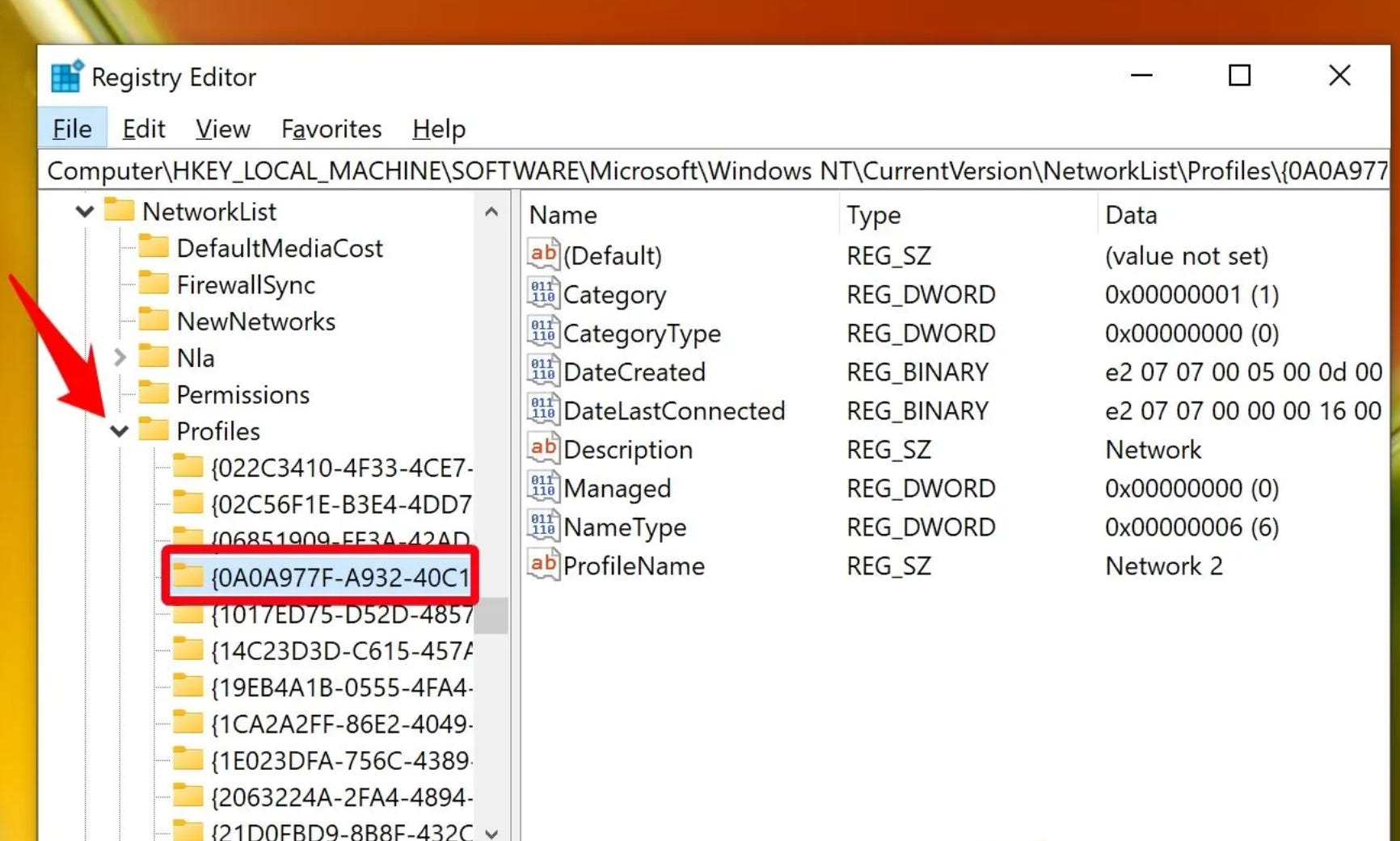
Historical network connections are stored under the NetworkList keys in the SOFTWARE hive. The Signatures subkeys identify all networks the device has touched, whether corporate, home, public, or hotspot, recording data such as SSIDs, DNS suffixes, and gateway MAC addresses. The Profiles subkey enriches this with timestamps, storing both the first and last time a system connected to a network, as well as the category (public, private, or domain).
Note:
Category 0 → Public
Category 1 → Private
Category 2 → Domain
Correlating ProfileGUIDs across these keys, often with the help of tools like Registry Explorer plugins, produces a timeline of network activity. Combining this data with external services such as Wigle.net allows investigators to geolocate a device to specific place.
Here is wigle.net tool Tool
Installed Applications
Installed applications leave traces in several Registry locations, with the most important being the Uninstall keys. These entries store an app’s display name, version, publisher, install location, and sometimes an install date. Subkeys also include uninstall commands, estimated size, and program icons. Both current and previously uninstalled programs can appear here, making this data useful for reconstructing what software has existed on a system. On 64-bit Windows, the WOW6432Node holds details about 32-bit applications, while per-user installs are recorded in NTUSER hives under each SID. Additional detail can be found in the Installer keys, which track MSI package properties, and in App Paths keys that record executable paths.
Key Registry Paths include:
HKLM\SOFTWARE\Microsoft\Windows\CurrentVersion\UninstallHKLM\SOFTWARE\WOW6432Node\Microsoft\Windows\CurrentVersion\UninstallHKU\<SID>\Software\Microsoft\Windows\CurrentVersion\UninstallHKU\<SID>\Software\WOW6432Node\Microsoft\Windows\CurrentVersion\UninstallHKLM\SOFTWARE\Microsoft\Windows\CurrentVersion\Installer\UserData\<SID>\Products\<ProductID>\InstallPropertiesHKLM\SOFTWARE\Microsoft\Windows\CurrentVersion\App PathsHKU\<SID>\Software\Microsoft\Windows\CurrentVersion\App PathsHKU <SID>\Software\Microsoft\Windows\CurrentVersion\Explorer\FileExtsHKU\<SID>\Software\Microsoft\IntelliType Pro\AppSpecific
From a forensic perspective, these locations are vital for profiling a system’s software environment. They allow analysts to identify suspicious or unauthorized applications, track what was installed for specific users, and determine when programs were added or updated. Since InstallDate values are not always reliable, investigators should also note subkey LastWrite times, which often provide stronger evidence of installation or update activity. Correlating these Registry artifacts with file system data and event logs produces a complete timeline of application presence and use.
AutoStart Programs
Autostart locations in the Registry are among the most important forensic checkpoints because they reveal which programs are configured to launch automatically at boot or logon. These keys are frequently abused by malware to gain persistence, but they also store legitimate startup entries such as chat clients or cloud synchronization tools. By reviewing them, investigators can quickly distinguish between normal auto-start programs and suspicious entries designed to maintain unauthorized access.
Key Registry Locations include:
NTUSER\Software\Microsoft\Windows\CurrentVersion\RunNTUSER\Software\Microsoft\Windows\CurrentVersion\RunOnceSOFTWARE\Microsoft\Windows\CurrentVersion\RunSOFTWARE\Microsoft\Windows\CurrentVersion\RunOnceSOFTWARE\Microsoft\Windows\CurrentVersion\Policies\Explorer\RunSYSTEM\CurrentControlSet\Services(service persistence viaImagePath,DisplayName, andStartvalues)
The Start value in services is especially relevant: 0x02 indicates automatic start, a common persistence technique, while 0x00 indicates boot start, which loads drivers and can be abused for stealth. Forensically, analysts look for unusual names, suspicious file paths like Temp or AppData, misleading filenames such as svchost.exe, or non-standard extensions like .ps1, .vbs, or .dll. Malware families such as Emotet and Qakbot have leveraged these registry locations to blend in with normal system processes. Signs of registry abuse can also include fileless malware storing encoded blobs or attackers relying on “living off the land” binaries like rundll32, regsvr32, or mshta.
MITRE ATTACK provides valuable info regarding those keys and you can read more here.
Conclusion
System configuration registry keys form the backbone of Windows forensic analysis because they document how a machine is built, named, connected, and maintained. By examining OS version and upgrade history, control sets, hostnames, time zones, network profiles, installed applications, and autostart entries, investigators can anchor timelines, detect persistence, and validate system state with confidence. These keys provide the context needed to interpret other evidence, ensuring that when analysts move on to user activity and behavior, they can place it against a solid foundation of how the system itself was configured and operating.